This SaaS launch readiness checklist covers 12 things to verify before you go live with your SaaS product. It focuses on the customer experience, commercial setup, legal requirements, and launch operations rather than technical production readiness. It assumes the product itself is safe to expose to real users, with authentication, secrets, testing, and monitoring covered.
1. Users Understand How to Get Started
Creating an account doesn't mean a customer knows how to use your product. Onboarding should show new users what to do after their first login and help them reach the result they expect.
How you guide the client depends on the essence of the SaaS product. For instance, a project management tool might guide users through creating a project, inviting teammates, and adding tasks, while an analytics platform might start by asking them to connect a data source.
To test it, open the product in an incognito window or create a completely new account. Imagine you don't know anything about the product and try to complete on your own the tasks the tool is designed for.
Can you understand what to do next? Are the essential actions easy to find? Do empty screens explain how to get started? If users get stuck, can they find help without contacting your team?
Pay attention to any spots where you get stuck, confused, or have to guess the next step. But keep in mind that too many pop-ups, instructions, or mandatory steps can make getting started feel like work. Let users skip optional tutorials and return to guidance when they need it.
2. A Customer Understands Your Pricing and Subscription Plans
Before going live, make sure customers can compare your plans without having to contact sales for explanations. If the site promises unlimited projects and the application caps them, customers will notice. If the page says three projects and nothing stops a fourth, you have given a plan away for free.
To test it, open your pricing page and your actual product side by side. Each plan should have a clear price, billing period, and description of its features and usage limits. For example, if it's a free plan, it should be stated that it includes, for instance, one project and limited storage, while a paid plan removes those restrictions and adds specific collaboration features, listing exactly which ones. Compare the limits and features listed on the website with what the product actually enforces. Then click the CTA buttons and make sure they take you to the right signup or checkout flow.
3. A Customer Can Pay and Get Access
Connecting a payment provider doesn’t mean the payment flow is ready. Test the complete transaction from checkout to subscription activation. A customer might pay successfully but still see the free version of the product if the payment confirmation isn’t processed correctly. A successful payment immediately gives the customer the correct access, and a failed payment triggers the right messages and alerts.
To test it, run through a successful payment, a declined card, and a refund in test mode. Then make one real payment with your own card and refund it, because considering that test and live environments are configured separately, a working test setup doesn’t guarantee that live payments will work.
Check that access updates correctly, emails go out, and your team gets notified about failures. If the whole flow works in both test and live mode, this check is ready.
Pay particular attention to failed subscription renewals. Decide what happens when a charge is declined: how many times the system retries, when the customer receives an email, and when access to paid features changes. Make sure your team is notified when a payment failure needs attention. A failed renewal shouldn’t sit unnoticed until the customer reports losing access.
4. Taxes and Invoices Are Correct
Charging a customer is one thing. Applying the right tax and providing an invoice they can use for accounting are another. Depending on where your business operates, where your customers are located, and what you sell, you may need to collect VAT or sales tax, register for tax in certain jurisdictions, or include specific details on invoices.
This is particularly important for B2B SaaS. A business customer may need an invoice with its company details and tax number to process the purchase. A standard payment receipt may not be enough. Before launch, identify your first target markets and confirm the tax and invoicing requirements for each with an accountant or an official government source. You don't need to solve every country's requirements at once, but you should know what applies to the markets where you'll start selling.
To test it, make two purchases. One is as a consumer, and the other is as a business customer with a tax ID. In each case, check the amount charged, the tax line, the currency and the invoice itself. Open the invoice the way an accountant would: it should carry your company name and address, your tax ID, the customer’s details, a date and a unique invoice number. Then refund one of the purchases and look at what the customer receives. If the invoice would survive your own finance team’s review, this check is done.
Payment providers such as Stripe offer tax calculation and invoicing tools, but using them doesn't automatically make your setup compliant. Check which features are enabled and whether the tax rules, business details, currencies, and invoice templates are configured correctly.
5. A Customer Can Manage Their Subscription
Customers should be able to manage their subscriptions without having to contact your team for every change. They need to be able to upgrade or downgrade their plan, cancel, update their payment method, and see when they'll be charged next. Each action should work as expected, and the customer should understand when the change takes effect.
To test it, sign up as a new user, start a trial, convert it to a paid plan, then try to upgrade, downgrade, update the payment method, and pay. Then try to cancel. Check what the customer sees at each step and what lands in your billing dashboard.
If customers have to contact your team to make routine changes or don't understand what happens after a failed payment, the process isn't ready. If manual fixes are fine for your first ten customers, they are not acceptable later.
6. A Customer Can Reach a Human
Before launch, decide how customers will contact your team, who will answer, and how quickly they can expect a response. Start with one official support channel (a support email, an in-app form or live chat), one named owner and one stated response time.
To test it, send a test message through your support channel as if you were a customer. Ensure that the message reaches your support channel, that someone is responsible for responding to it, that it's actually responded to, and then evaluate if the response time you’ve stated corresponds to the actual response time. This will allow you to verify what's realistic for your firm.
For a first launch, a reply within the same business day is a reasonable starting point for a small team. It's better to be clear about your availability than promise 24/7 support you can't maintain.
If your product supports business-critical workflows, customers may expect faster responses, especially when their work can be affected by an issue. Decide how urgent requests are handled and who takes them.
7. Legal Documents and Data Requests are Covered
Before accepting registrations, make sure customers can find your Terms of Service and Privacy Policy during signup. The Privacy Policy should describe what information your product collects, why it collects it, how it is used, and how long it is retained. Don't copy another company's policy, as it describes their data flows, not yours.
Customers should be able to export and delete their data. A self-service feature can wait, but someone should be responsible for receiving requests, verifying them, and handling them within applicable legal deadlines. Make sure you understand what data can be deleted and what must be retained for legal or other legitimate reasons. Have qualified legal professionals review your documents and procedures for the markets you serve.
To test it go through signup as a new user and confirm the legal documents are easy to find. Then test (or simulate) a data export and a deletion request to make sure someone knows how to handle them and that you understand what can and cannot be deleted. If the documents are visible and the process is defined, you’re covered.
If you serve customers in the EU, check which GDPR requirements apply. These include informing people about how their personal data is processed and, where applicable, supporting requests to access, correct, delete, or transfer their data.
If your SaaS processes personal data on behalf of business customers, you may also need a Data Processing Agreement (DPA), so having a standard version ready can prevent legal review from delaying a deal.
8. Product Documentation and FAQs Are Available
Customer support can answer individual questions, but documentation helps users solve common problems independently. You don't need a large knowledge base on day one. You do need instructions that match the current product and are easy to find.
To test it make a list of the questions you expect new users to ask most often, like how to set up an account, use essential features, connect third-party services, invite teammates, manage subscriptions, and troubleshoot common issues. You can also cover recurring questions about pricing or product limitations. Then try to answer each one using only your current documentation or FAQ.
Keep the documentation easy to find and update it whenever the product changes. Outdated instructions can create more support requests than having no instructions at all. If the most common “how do I…?” questions have clear, current answers that users can find without contacting support, then you are done with this step. If you keep needing to explain things yourself, these docs require additional work.
9. You Can See What Users Do Inside the Product
Website traffic tells you how many people visit your site. It doesn't tell you whether they complete onboarding, use key features, or become paying customers. For instance, if many users sign up but few complete the first key action, onboarding may need work. If users try a feature but rarely return to it, look at whether it's useful or easy to understand.
Set up product analytics before launch so you can see where users get value and where they drop off. Start with a few metrics tied to the customer journey: signup conversion, activation, trial-to-paid conversion, feature adoption, and churn. Define what each metric means for your product. For example, activation might mean creating a first project, connecting a data source, or completing another action that shows the user has reached an initial result.
To test it, sign up as a new user and complete the main early actions while watching your analytics. Confirm that the key events (signup, activation, important feature use) are actually being recorded.
Once you go live, setting up that analytics will help you answer questions like “Are people getting value?” and “Where do they get stuck?” with real data.
10. Customer Feedback Has a Clear Path to Action
Internal testing shows whether the product works as expected. Customer feedback shows what happens when people use it in real situations. Some users will struggle with a workflow, others will report bugs, and some will ask for features you hadn’t considered. This check isn’t about answering customers. It’s about changing the product based on what they tell you.
Decide how you’ll collect feedback. You can use in-app forms, short surveys, customer interviews or feedback sessions with early users. Support conversations count too. Don’t let reports get buried in separate emails and chats. Every report goes into one shared tracker, such as Jira, Linear or GitHub Issues, and one named person decides what happens to it. The goal is to capture more than isolated complaints. Look for recurring problems, usability issues and requests that come up across different customers.
Every report ends in one of three outcomes: fix it now, schedule it for later, or decline it. Agree in advance how the team judges impact. A payment issue that prevents customers from completing a purchase needs attention before a minor visual inconsistency. An onboarding problem affecting most new users may matter more than a feature request from one customer. Then set a regular meeting, weekly for the first month, where the named person goes through new reports and gives each one an outcome.
To test it, send one bug report and one feature request through your usual channels, one of them through support. Check that both reach the tracker and that the named person will see them at the next review. If both reports are in the tracker with an owner, this check is done.
11. Transactional Emails Work Correctly
Your SaaS will communicate with customers through email at several points in their journey. These messages are part of the product experience, not just an administrative detail.
Transactional emails include registration confirmations, welcome messages, password resets, payment receipts, subscription updates, and trial expiration reminders. Before launch, you need to make sure they are sent, contain the correct information, and include working links.
To test it, trigger the main emails one by one: signup confirmation, password reset, welcome message, payment receipt, trial ending reminder, and cancellation confirmation. Open them on both desktop and mobile, click the links, and check the content.
Pay attention to timing. A password reset email should arrive promptly. A trial expiration reminder should reach the customer before access changes, not afterward. Use a recognizable sender name and an address associated with your product’s domain. Check that customers can reply or find a contact address if they need assistance. If they all arrive when expected and look correct, this check is done.
12. You Have Clear Ownership For the First Weeks After Launch
Passing the previous checks doesn't mean the work is finished. Some problems only become visible when real customers start using the product. Without clear ownership, issues can go unnoticed, or responses can become reactive.
Before launch, decide who will monitor key signals during the first two weeks: onboarding completion, payment failures, support volume, and critical errors. Define what counts as a red flag, who gets notified, and who is responsible for responding. Someone should be explicitly on point for customer-facing issues each day, even if the team is small.
To test it, run a short launch simulation. For example, report a failed payment, a critical bug, and a sudden increase in support requests. Check whether each alert reaches the right person, whether someone takes ownership, and whether the team knows how to escalate the issue. If reports get lost or nobody knows who should respond, clarify responsibilities before launch.
Also decide what happens if a new release breaks a critical workflow. Can the team disable the affected feature or redeploy the previous version? Who makes that decision, and who is responsible for carrying it out? If a release includes database changes, make sure the recovery plan accounts for the data too.
A short internal launch plan that names owners and escalation paths is enough at this stage. The goal isn't to predict every problem, but to make sure the team knows what to do when one appears.
Score Your Launch
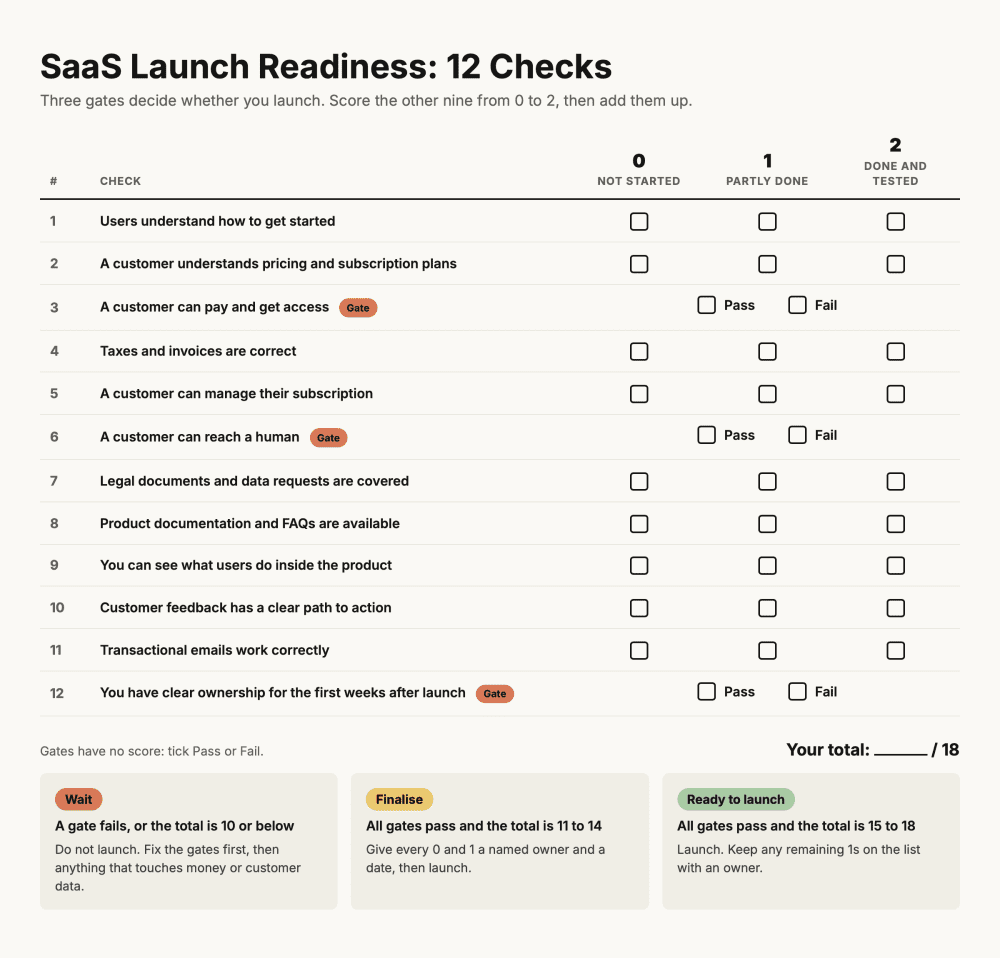
Three checks are gates: a customer can pay and get access, a customer can reach a human, and someone owns the first weeks after launch, including the rollback plan. Each is pass or fail. If one fails, you don’t launch.
Score the other nine from 0 to 2. Each check above ends with a test and a sentence saying when it’s done. If you passed the test, that’s a 2. If it’s partly done, or open on purpose with a named owner and a date, it’s a 1. If nobody has started, it’s a 0.
At 15 or more, launch. Between 11 and 14, launch only after every 0 and 1 has a person and a deadline. At 10 or below, move the date and start with the zeros that touch money or customer data.
Conclusion
A successful SaaS launch requires more than a working application. Customers need to understand the product, create accounts, complete payments, and get support when they need it. Your team also needs the processes and information to manage these activities once the product goes live. Use these 12 checks to identify gaps before launch rather than discovering them through frustrated customers. You don't need a perfect product or a fully developed support organization on day one. But you do need a clear, working process for the essential parts of the customer journey.
If you're preparing to launch a SaaS product and need help with development, integrations, or product implementation, ScrumLaunch can help you turn your product plans into a working solution.