You built something real in a weekend. With Cursor, v0, Lovable, Bolt, or Replit you prompted your way from an idea to a feature-rich, polished MVP without building a development team first. That's a huge advantage.
But there's an important step between “it works” and “it's ready for production.”
When you're showing an MVP to your team, testing an idea, or demonstrating it to investors, an AI-generated MVP might be perfectly fine as is. Once real users start signing up, the requirements change.
Real people are entering real data. They're creating accounts, uploading information, making payments, and using features in ways you could never anticipate. That's when security vulnerabilities, architectural problems, weak authentication, poor error handling, or unreliable dependencies can become real issues.
This guide covers what to audit and harden before moving an AI-generated MVP into production, without automatically throwing away what you built.
Why Vibe Coding Works, and Where it Stops
"Vibe coding" means building software by describing what you want in plain language and letting an AI tool generate the code, often with little review of what it produces. Tools like Lovable and v0 have made this possible for founders with no engineering background.
Non-technical founders can now build working prototypes that would have required a development team just a few years ago. They can be feature-rich, polished, and far more capable than a typical prototype used to be. They test assumptions, collect feedback, and pivot quickly, and it hardly matters if the database structure is untidy or the login has rough edges. If you are still testing an idea, a vibe-coded MVP is exactly what you need, and you can stop reading here.
The trouble is that the same thing that makes vibe coding great for prototypes makes it risky in production. And before real users touch the product, it's worth checking what you actually built.
What "Production-Ready" Actually Means
Production means real users, real money, and real data.
It means handling payments securely, keeping the product reliable as usage grows, and releasing new features without breaking what already works. It also means maintaining and extending the code months and years from now, not just getting it to work this week.
You’re no longer asking only, “Does this work?” You also need to ask: “What happens when more users arrive?” “Is the data secure?” “Can we change this six months from now without rewriting half the product?”
A production-ready product usually needs five things to hold up:
-
security, so only the right people can see and do the right things;
-
data integrity, so customer data is protected and backed up;
-
performance, so the product stays fast as usage grows;
-
reliability, so failures are caught and handled instead of passing silently;
-
and maintainability, so you can keep adding features without breaking what already works.
You don't need all of this on day one, and you don't need it for a prototype nobody depends on. It becomes necessary when the stakes change: when you start taking payments, when you hold personal, health or financial data, when customers rely on the product to do their work, or when a customer's security team starts sending questions you cannot answer. How deep you go depends on what is at risk. A tool that stores a few notes needs far less than one that handles payments or personal data, and many founders start with the riskiest parts, meaning login, payments and customer data, while they keep building features.
Audit Before You Touch Anything
First get an honest picture of what you have. You do not have to do the technical review yourself, but you should know what to ask your engineer or development partner to check. These are usually complexity, data access, secrets and behaviour under load. For example: What happens when 50–100 people use the product at the same time instead of just one? Are there keys, passwords or business logic sitting in the frontend code that should not be there? Which parts of the code do too much, since AI tools love enormous files? Where does user data flow, and who can reach it?
AI-generated code often looks tidy, which is exactly why it gets approved without anyone tracing what it assumes. The most revealing test is simple: ask a developer to explain the sign-up, login and payment flows back to you. If nobody can clearly say what the code does and why, the product is not understood well enough to be trusted, even if it looks clean on the surface.
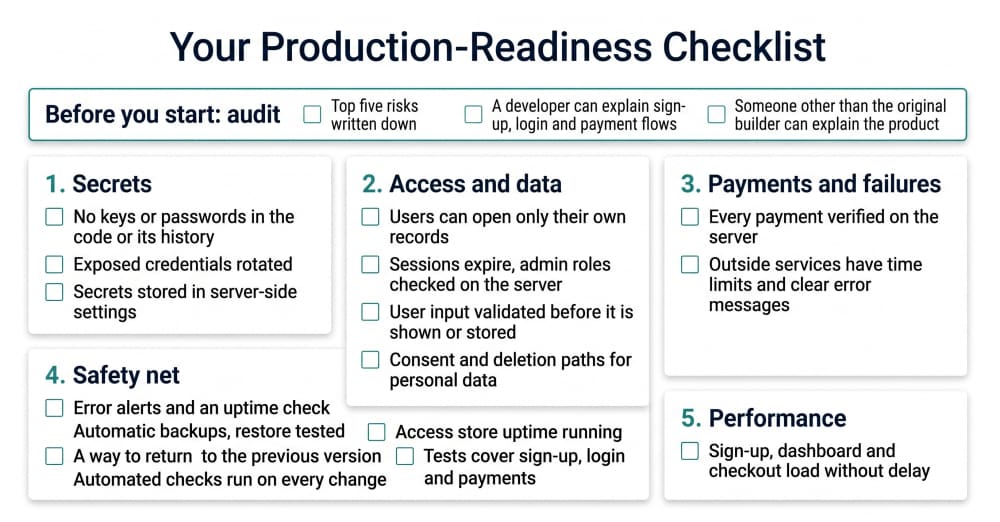
Once you have the picture, write down the five biggest risks. Those get fixed first, and the cosmetic issues wait.
Most important steps in getting your MVP production ready
The steps below cover the problems we see most often in AI-built products, in order of priority. If your audit turned up a bigger risk, start there, but for most products this order is a safe default.
Step 1: Lock down your secrets
This is one of the first things to check before an AI-generated app goes into production. AI tools often write API keys, database passwords, and tokens straight into the code. The model doesn't do this with malicious intent; it chooses the shortest path to a working example, and the shortest path usually means writing the secret in plain text.
An exposed key can mean someone could steal your data, could run up a huge bill on your cloud account, take control of parts of your app, etc.
According to GitGuardian’s State of Secrets Sprawl 2026 report, Claude Code-assisted commits had a 3.2% secret-leak rate - more than double the 1.5% baseline across public GitHub. And while that measures one tool, the pattern is common to AI coding assistants in general.
Before your app goes live, make sure it isn't carrying its passwords around in its own code. Search the whole codebase, including its full history, for anything that looks like a key or password, since automated scanners such as TruffleHog can do this in minutes. If you find a real credential in the repository, don't just delete it. Revoke or rotate it first. Removing it from the current version of the code isn't enough, since it remains in the history, so treat it as compromised.
Move secrets out of source code and version control, and store them in environment variables or a proper secrets-management system. The goal is simple: your source code should contain instructions for accessing a service, not the password that gives access to it. You’ll know it’s fixed when a scan of the full history comes back clean, and when removing a required setting makes the app fail with a clear error instead of quietly using an old hardcoded value.
Step 2: Make authentication, data access and the database safe
Vibe-coded MVP databases tend to have wide-open access rules and no plan for deleting user data. Once you have real users, this open setup becomes dangerous and slow.
The biggest risk is broken access control, i.e., that the app doesn’t properly check “Does this person actually own this information?” The product can look and work perfectly normally, while any logged-in user might be able to see or change other people’s private data just by changing a number in a link or request. These problems often stay hidden for a long time because everything appears fine on the surface.
In April 2026, a researcher reported that a flaw in Lovable's API let any free account read other users' source code and database credentials on public projects created before November 2025. Lovable disputed that this was a data breach and fixed the issue, but the underlying lesson applies to any product: a missing ownership check - if the system doesn’t check who actually owns the data - can expose everyone's data at once.
So the first job here is to make sure users can only read their own records. A quick test is to log in as User A, take the ID of something belonging to User B, and try to open it. The system should clearly refuse.
Authentication needs the same kind of check. It is not enough for the app to have a login page. You need to make sure the server actually verifies who the user is and keeps that identity attached to their requests. Sessions should expire appropriately, password reset links should not work indefinitely or more than once, and admin functions should check the user's role on the server rather than simply hiding an Admin button in the interface.
And if you have users in the EU, the UK or other regions with data protection laws, requirements around consent, deletion, retention and handling of personal data may apply.
The second important job is handling what users type because AI-generated code is often weak at protecting against malicious input. In Veracode's testing of more than 100 AI models, AI-generated code failed to properly protect against a common attack called cross-site scripting in 86% of the relevant cases. In plain terms: if a user types something dangerous and the app just displays it or saves it without checking, that text can run as code in other people’s browsers. So every place where users can enter data should be checked to make sure that input is properly validated and safely handled before it is displayed, stored, or used in a query.
Step 3: Harden payments and error handling
Another important part of moving from MVP to production is making sure the app handles failures properly, especially when it depends on outside services you don't fully control.
AI-generated code is often built around the happy path - the payment succeeds, the email is sent, the AI provider responds, the file uploads - because that's what was described when creating the MVP. Production also has to handle the cases where those things fail.
Every call to an outside service, whether it's a payment provider, email service, AI provider, or file storage, should have a time limit and treat different failures appropriately. A timeout is not the same as an invalid request, which is not the same as hitting a rate limit. The user should receive a useful message instead of a blank screen, an endless loading spinner, or an error that exposes technical details.
You’ll know this part is fixed when you deliberately make an outside service fail, for example, by simulating a timeout or an unavailable service, and the application fails gracefully instead of hanging or showing an internal error.
Payments deserve additional attention. A payment can appear to work in the interface while the underlying transaction has not actually happened. The server should verify with the payment provider that the transaction happened and that the amount is correct. It should never simply trust a payment confirmation or amount sent by the user's browser.
Step 4: Set up testing, deployment and monitoring
The earlier steps reduce the chance of something breaking. This step helps you notice problems early and recover quickly when something does break.
Before you launch, you should at least have a way to learn about serious errors automatically instead of waiting for users to complain. Your application should record important errors with enough context to understand what went wrong, rather than just showing the user a generic message. You also need a simple uptime check that regularly visits your live application and alerts you if it stops responding. This can be as simple as an automated check every few minutes that sends an email or message when the site is down.
Your data needs a similar safety net. Set up automatic database backups on a schedule and keep multiple recent copies rather than relying on a single backup. Make sure the backups are stored separately from the live database, so a problem with the production system cannot destroy both. Most importantly, test that you can actually restore one. A backup that has never been restored is only an assumption that your data is recoverable.
You should also have a clear way to return to the previous version if a new release causes problems. Keep the previous working version available and make sure you know how to switch back to it. For a small MVP, this does not need to be complicated - the important thing is that you can recover quickly instead of trying to repair a broken release while customers are using it.
Before deploying a new version, you should also have a basic automated check that runs when code changes. GitHub Actions is a straightforward way to set this up. The initial workflow does not need to be complicated: it can install dependencies, build the application, and run basic tests. If something fails, the new version should not be deployed.
This matters because fixing the current problems is only half the job. Every new feature can introduce a regression - something that worked before can stop working after a change. Automated checks give you a basic safety net so you do not have to rely on manually checking the whole application after every update. At minimum, test that the application builds successfully and that its most important user flow still works after a change.
Soon after launch, it is wise to expand this setup with a separate staging environment, where you can test important changes before real users see them. You can also add more automated tests for critical flows such as sign-up, login, payments, and the main actions users take in the product.
One caution: if AI wrote both the code and the tests, the tests can share the same blind spots and only check the happy path. That’s why don’t let the AI decide what to test. A person should choose the important scenarios, especially the ones where things can fail, and make sure those are covered.
You do not need a perfect or complex setup on day one. You do need to avoid flying completely blind, keep a recoverable copy of your data, and have a fast way back if a release goes wrong.
Step 5: Fix the performance problems that matter
Once the product is safe and reliable, you can look at performance. Most slowness in AI-generated apps comes from a few repeat causes: pages requesting the same data over and over, loading everything at once instead of only what the user needs, or sending the same database query hundreds of times.
Start by measuring where the product is actually slow instead of trying to optimize everything. Look at the pages and actions users rely on most, such as sign-up, the main dashboard, search, checkout and other key user flows. Check how long they take to load and which database queries or API calls are taking the most time.
Some fixes are straightforward. If the app frequently searches the database by a particular field, make sure that field has an index so the database does not have to scan large amounts of data every time. If a dashboard loads hundreds of records when the user can only see ten at a time, load the data in smaller batches. If the same information is requested repeatedly, check whether it can be reused instead of fetched again.
You do not need every page to be perfect, and this step comes last for a reason, since speed matters less than safety. Fix the few problems that have the biggest effect on the user experience first.
What if the audit finds deeper issues?
Whichever tool helped you create your AI-built MVP, the next step is usually the same: keep the product users already like, and fix the underlying structure. For most products, fixing security issues, tightening access controls, improving error handling, and making the existing product safer and more reliable are enough to launch them into production.
Sometimes, though, the audit finds something deeper. Maybe the code has become so tangled that even an experienced developer cannot safely change it. Maybe the data model no longer fits the business, so every new feature requires workarounds. Or one part of the architecture has become a fundamental limitation.
That does not automatically mean you need to throw everything away.
Sometimes only one part of the product is causing problems. A backend process, a particular integration, or another component may have reached its limits while the rest of the application is perfectly usable. In that case, you can rebuild that part and leave the rest in place, connecting the new component to the existing product through an API. This lets you replace the weakest part without starting over.
A full rebuild makes sense only when the audit shows that the foundation itself is the problem. For example, if nobody can safely understand or change the code, fixing one thing regularly breaks another, the data model fundamentally conflicts with the business, or the platform has hard limits you have already reached, continuing to patch the same foundation may create more problems than it solves.
The important point is to base the decision on what the audit actually shows - not on frustration with the code or the fact that it was generated with AI. The goal is not to replace an AI-built MVP because it was AI-built. The goal is to keep what is working, fix what can be fixed, and replace only what truly needs replacing.
Whichever the situation is, your vibe-coded MVP is not wasted. It is a working version of the product that has already tested your assumptions and shown what customers need. If you do rebuild part or all of it, that knowledge comes with you.
Closing thought
A vibe-coded MVP is a legitimate way to start. It proves demand quickly and cheaply, which is exactly what an early-stage product needs. Making it production-ready is not a penalty for moving fast, it’s simply the next stage of the same process. If you have an AI-built product that’s heading toward real users and you want a clear picture of the risks, we can help you review it and decide what actually needs to be fixed before launch.
Get in touch