This guide breaks down where Supabase wins, where Firebase still has an edge, and which platform is the better foundation for your app.
What is Firebase?
Firebase has been around long enough that many developers simply assume it's part of the modern application stack. Originally launched in 2011 and acquired by Google in 2014, it evolved from a real-time database into a full Backend-as-a-Service platform used by thousands of companies worldwide.
The core of the platform is a NoSQL document database, Firestore, that stores data as nested JSON-like documents in collections, without joins, foreign keys, or strict schemas. Around it Firebase has created a broader ecosystem that includes authentication, serverless functions, file storage, hosting, analytics, and increasingly, AI tooling through Google's Gemini ecosystem.
Firebase is particularly strong for mobile applications, rapid prototyping, and teams already invested in Google Cloud. Its tooling is mature, its SDKs are well-established, and it remains one of the fastest ways to get an application from idea to production.
What is Supabase?
Supabase, launched in 2020 is often described as an open-source alternative to Firebase, but that description understates its capabilities.
The platform emerged at a time when many developers wanted the speed and convenience of BaaS like Firebase, but combined with the flexibility of a traditional relational database. Supabase is built on PostgreSQL, one of the most widely used databases in the world, and gives developers access to what they already know rather than introducing an entirely new way of working.
That decision shapes almost everything about the platform. Developers get the benefits of SQL, relational data modeling, joins, transactions, and a mature database ecosystem while still having access to the convenience of managed authentication, file storage, real-time subscriptions, serverless functions, and automatically generated APIs.
But the bigger difference is philosophical. Firebase is designed around Google's ecosystem. Supabase is designed around open standards and portability. Because the entire platform is open source, teams can self-host it, move their infrastructure if needed, and maintain greater control over their data and architecture as applications grow.
That combination of developer experience, PostgreSQL compatibility, and reduced vendor lock-in has helped Supabase evolve from a promising open-source project into a platform trusted for production applications. For many teams in 2026, it is no longer the alternative to Firebase. It is the starting point for evaluating modern backend infrastructure.
Supabase vs Firebase
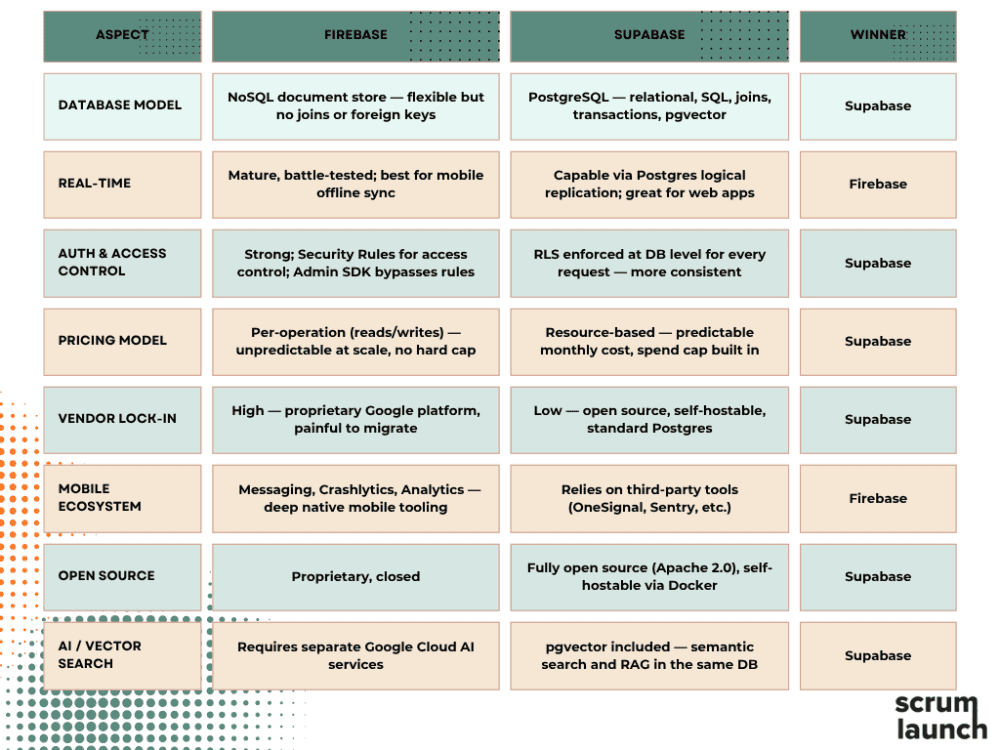
Database Different Philosophies: SQL vs. NoSQL
Firebase was built around Firestore, a NoSQL document database where data is stored in structured documents organized into collections. This schema-less model works well for simple, hierarchical data structures. It also offers considerable flexibility, making it a good fit for projects where data structures might change frequently.
However, it struggles with relational data. If you need to connect data - like posts that have comments, or orders that belong to a particular customer - there are no joins, so you often have to denormalize: duplicate data across documents to avoid expensive multi-step queries. For smaller applications this tradeoff is manageable - it's actually part of why Firebase feels fast to get started with - but as products grow and data modeling becomes more complex, denormalization can lead to consistency challenges that are difficult to unwind.
Supabase, on the other hand, is built around PostgreSQL - a powerful, mature relational database that supports SQL queries, foreign keys, complex joins, window functions, and advanced extensions such as pgvector for AI embeddings. It makes it a natural fit for structured data. For most web apps that have clear relationships between data, Supabase’s SQL-first approach feels more intuitive and powerful. Besides, developers who already know SQL can start building immediately without learning a new query language.
A notable recent addition
In 2025, Google introduced Data Connect, which brings PostgreSQL into the Firebase ecosystem via Cloud SQL. Firestore remains the primary database experience, but Data Connect gives developers a relational option that Firebase previously lacked entirely - a signal that even Google recognizes relational databases as increasingly important for modern application development. That said, Data Connect is still maturing. It sits outside the core Firebase developer experience as a separate product, and carries additional infrastructure costs on top of your standard Firebase bill.
Authentication and Authorization
Both platforms provide built-in authentication with email/password, social OAuth providers, and phone verification.
Firebase Auth is a proven solution that supports a wide range of login scenarios with minimal configuration. It supports over 20 providers out of the box, anonymous authentication (useful for frictionless onboarding), and ready-made UI components via FirebaseUI.
Access control is managed through Security Rules - a declarative language for specifying who can read and write what. One important caveat: server-side code running with the Admin SDK bypasses these rules entirely, so authorization logic has to be implemented separately on the backend.
Standard Firebase Authentication - email, social logins - is free up to 50,000 MAUs. For SAML/OIDC there is no-cost quota for up to 50 SSO users, then billed according to Google Cloud Identity Platform.
Supabase Auth supports OAuth, magic links, phone OTP, and SAML SSO. Its structural advantage is Row Level Security (RLS) - policies written in standard SQL that are enforced at the database level for every request, regardless of where that request originates: your app, a background job, a migration, or a direct SQL connection. For apps with complex authorization logic, this is a meaningful security advantage over Firebase's Security Rules. In 2026, Supabase enabled RLS by default on new tables and introduced a new API key system that automatically revokes compromised keys. It also added the ability to turn your project into a full OAuth2 identity provider - useful for teams building platform ecosystems.
SAML SSO is available from the Pro plan, with 50 users included and each further user charged additionally.
File Storage
File storage is one of the areas where the platforms are more similar than different. Both support uploads, downloads, access control, and CDN-backed file delivery.
Firebase Cloud Storage is backed by Google Cloud infrastructure. Running on it, Firebase offers virtually unlimited scalability and is proven to handle huge traffic for mobile apps. It supports resumable uploads and fine-grained access control through Firebase Security Rules. The free Spark plan includes 5GB of storage; beyond that, the Blaze plan charges per GB. For applications that need image processing, thumbnail generation, or custom transformations, developers typically rely on Cloud Functions or Firebase Extensions.
Supabase Storage takes a slightly different approach. Supabase has S3-compatible object storage with built-in image transformations - resizing, cropping, and on-the-fly conversion - directly within the platform without the need for third-party services. Access control uses the same RLS policies as the database, creating a more unified authorization model across storage and database resources.
For most apps, either platform will handle file storage requirements without any issues. The difference is less about capability and more about developer experience. Firebase benefits from Google's mature infrastructure ecosystem, while Supabase offers tighter integration between storage, authentication, and database permissions.
Serverless and Edge Functions
Both Firebase and Supabase allow developers to run backend code without managing servers, but they approach the problem from different directions.
Firebase Cloud Functions are mature and deeply integrated with the Google Cloud ecosystem. They support Node.js and Python and can be triggered by changes in Firestore, Authentication events, file uploads, scheduled jobs, Pub/Sub messages, or HTTP requests. For teams already using Firebase heavily, this creates a tightly integrated event-driven architecture with very little infrastructure work required.
Supabase Edge Functions are optimized around a different idea: moving compute closer to users. Built on Deno and deployed globally, they are designed for low-latency workloads and applications with a distributed user base. They are TypeScript-based and require no build step, but the Deno runtime means some Node.js libraries may not be directly compatible. Event-driven patterns require manual configuration via database webhooks or pg_notify instead of native triggers.
The tradeoff comes down to ecosystem versus distribution. Firebase offers a more mature event system and deeper integration across Google's services. Supabase offers a more modern edge-first architecture that can reduce latency and improve responsiveness for globally distributed applications. The deciding factor is often whether your architecture benefits more from Firebase's extensive event triggers or Supabase's edge-native execution model.
Vendor Lock-in
One of the most important but often underestimated differences between Firebase and Supabase is how much flexibility you retain if you ever decide to move away from the platform.
Firebase is a fully proprietary Google platform. Your data, authentication logic, and backend services are tightly integrated into Firebase's ecosystem. While this tight coupling is part of what makes it fast to build with, it also means that migrating a moderately complex app to any other platform requires significant effort covering data restructuring, rewriting queries, and rebuilding authentication flows. While Google provides excellent uptime and reliability, this dependency on Google's infrastructure creates a long-term strategic risk for businesses that value data sovereignty.
Supabase is different by design. The entire platform - database, authentication, storage, and admin dashboard - is open source under the Apache 2.0 license. You can self-host Supabase using Docker, run it on your own infrastructure, and maintain full control over your data. The pg_dump command lets you migrate your entire schema, data, RLS policies, and functions to any Postgres-compatible host - Amazon RDS, Google Cloud SQL, or a self-managed server.
You lose the dashboard and auto-generated API, but your business logic and data remain intact. Migration takes weeks, not months.
This portability gives teams genuine exit options without major reengineering effort and dramatically reduces vendor lock-in risk. If your project has exit strategy requirements - due diligence or regulatory compliance - this distinction is important.
Real-time & Mobile Experience
Firebase was originally built for real-time use cases, and that history still shows. Its Firestore and Realtime Database provide low-latency synchronization out of the box, with mature support for real-time listeners, presence detection, and offline persistence on mobile devices. For native mobile applications, this combination is difficult to replicate. Data sync works reliably, even in unstable network conditions, which is one of the reasons Firebase became the default choice for mobile-first products.
Supabase takes a different approach. Instead of building a proprietary synchronization layer, it uses PostgreSQL’s logical replication to stream database changes to subscribed clients. For typical web application use cases - live dashboards, notifications, feeds, and collaborative updates - this works well and continues to improve. However, it is fundamentally more database-centric rather than mobile-first in design.
Beyond real-time data, Firebase extends into a broader mobile ecosystem. Firebase Cloud Messaging (FCM) provides push notifications, while Crashlytics offers mature crash reporting and diagnostics. Together, these tools create a tightly integrated experience for monitoring and engaging users across mobile applications.
Supabase does not aim to replicate this ecosystem. Instead, it relies on integrations with external tools for notifications, analytics, and crash reporting. It adds flexibility, but also means assembling a broader stack rather than relying on a single integrated platform.
The difference here is less about capability and more about philosophy. Firebase offers an opinionated, end-to-end mobile and real-time system. Supabase provides a composable backend centered around PostgreSQL, where real-time and mobile features are part of a larger toolchain rather than the foundation itself.
Supabase vs. Firebase Pricing: A Pricing Breakdown
Pricing is one of the most important differences between Firebase and Supabase, and it reflects two fundamentally different approaches: operation-based billing versus predictable infrastructure pricing.
Firebase follows a pay-as-you-go model tied to individual database operations. The Spark (free) tier includes 1GB of Firestore storage with 50,000 reads, 20,000 writes, and 20,000 deletes per day. Beyond that, the Blaze plan charges per operation: $0.03 per 100,000 reads, $0.09 per 100,000 writes, and $0.01 per 100,000 deletes.
Those numbers look small in isolation. The problem is how they compound. Firestore's real-time listeners trigger a read operation every time a document changes, meaning a single screen with live data can generate hundreds of reads per session without any obvious indication in your code. An unoptimized query, a misconfigured listener, or an unexpected traffic spike can push costs from manageable to significant overnight. Firebase allows you to set budget alerts via Google Cloud Billing, but these are notifications - not hard caps. Requests succeed even after you've exceeded your budget.
Supabase operates on a resource-based quota model. You pay for infrastructure - compute, storage, bandwidth, rather than individual operations. The free tier includes 500MB of database storage and 50,000 monthly active users, though projects pause after 7 days of inactivity. The Pro plan at $25/month includes 8GB of storage, 100,000 MAUs, daily backups, and no pausing. Critically, Supabase provides a spend cap that prevents unexpected billing spikes - cost controls are on by default, not opt-in.
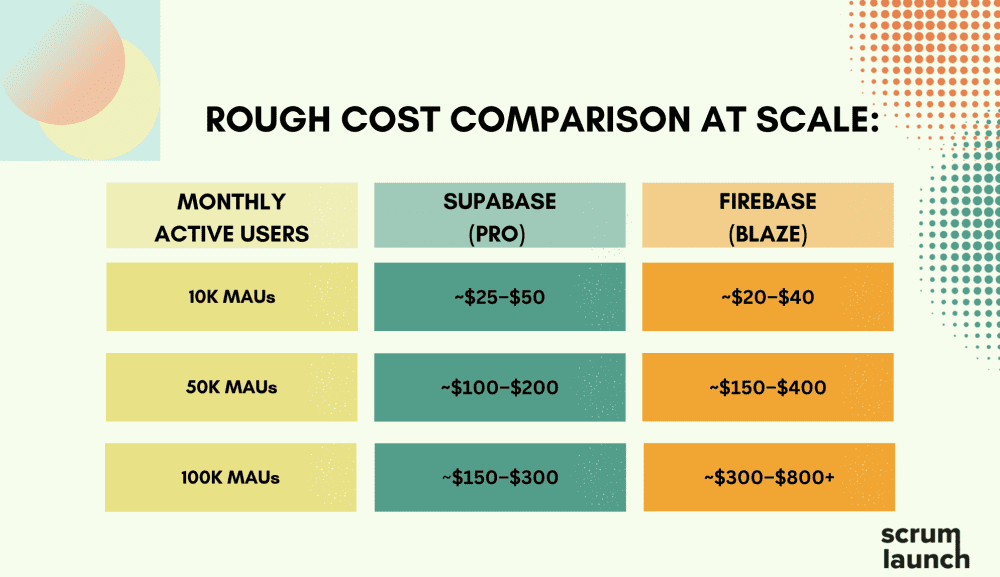
At scale, the difference becomes significant. Firebase's pricing works well at small scale and for apps with low read frequency. For read-heavy applications, Firebase can run 3–5x more expensive than Supabase at comparable scale - and the gap widens as user counts grow. For teams that need predictable budgets, Supabase's model is the more defensible choice.
The Real Decision Framework
Forget feature tables. The actual fork in the road comes down to four questions:
1. Do you think in SQL or documents?
If your data has relationships - users have orders, orders have line items, line items have products - you want a relational database. Supabase is Postgres. Firebase Firestore is a document store that requires you to either denormalize your data or run expensive multi-document fetches for anything relational. Founders building B2B SaaS, marketplaces, or anything with complex data models will hit Firestore's limits fast.
2. Are you building mobile-first with heavy Google integrations?
Firebase was built for mobile. Its SDKs for iOS and Android are mature, the real-time sync is tightly optimized for mobile clients, and if you're already using FCM (push notifications), AdMob, or Crashlytics, Firebase is the cohesive choice. If your product is web-first or a cross-platform app without deep Google tooling dependencies, this advantage disappears.
3. How much does vendor lock-in concern you?
Firebase is Google's proprietary infrastructure. Migrating off it, especially Firestore, is a significant rewrite. Supabase is built on Postgres, the most portable database in the world. If you ever need to move to a self-hosted setup, a different cloud provider, or a fully managed Postgres service, your data and most of your queries come with you. For founders thinking about acquisition, enterprise sales, or infrastructure flexibility at Series A, this matters.
4. What's your team's SQL fluency?
If your backend developers haven't written a JOIN in three years, Firebase's document model will feel faster to move in initially. If your team is comfortable with SQL, or if you're planning to hire engineers who are, Supabase's Postgres foundation is an asset, not a barrier.
So Which is Better?
The right choice depends on the specific requirements of your project.
Firebase wins in these scenarios:
Mobile-first apps with real-time sync requirements. If you're building a chat app, a live collaboration tool, or anything where sub-second data sync to mobile devices is a core feature - Firebase's real-time listeners and offline-first mobile SDKs are genuinely excellent. Supabase has real-time built in, but Firebase's mobile SDK depth is deeper.
Teams already inside the Google ecosystem (Analytics, Crashlytics, FCM push notifications). If your team uses GCP, your app uses FCM for push notifications, or you're integrating Google Analytics deeply - Firebase gives you native tooling that would require custom work to replicate elsewhere.
Projects with non-relational data models. If your data genuinely fits a document store - think content management, event logging, user activity feeds - Firestore's model can be a natural fit. The problems start when you force relational data into documents.
Supabase wins for:
B2B SaaS with relational data. Users, organizations, subscriptions, permissions, audit logs - all of this maps cleanly to Postgres and becomes increasingly painful in Firestore. Supabase is the default choice for any product where data relationships matter.
Founders who care about exit flexibility. Postgres is portable. Firestore is not. If you're building something you expect to sell, raise on, or hand to an enterprise IT team for review, Postgres-based infrastructure is a significantly easier conversation.
Cost predictability at scale. Resource-based pricing (what Supabase uses) is dramatically more predictable than operation-based pricing that Firebase uses. When you're trying to model your infrastructure costs at Series A, "it depends how many Firestore reads your users generate" is not a useful answer.
The Migration Question: When and How Do You Migrate Between Supabase and Firebase?
If you're already on Firebase, it may be time to consider moving to Supabase when your Firestore queries are getting complex, you're denormalizing data to avoid expensive reads, your bill is growing faster than your user count, or you're building features that are a natural fit for a relational database.
Supabase provides an official Firebase migration tool that imports Firestore collections into PostgreSQL tables. Auth migration requires re-hashing passwords, since the two platforms use different hashing algorithms - users may need to reset passwords after the switch. Storage migration is manual: files need to be downloaded from Firebase and re-uploaded to Supabase Storage.
Migrating from Supabase to Firebase is also possible, but painful. You lose SQL, joins, and RLS. Each table becomes a collection. Relationships become references or denormalized copies. So, migrating from Supabase to Firebase is rarely advisable unless your product has pivoted to a mobile-first approach or your team is consolidating onto Google Cloud infrastructure.
Conclusion
The Supabase vs. Firebase decision in 2026 is less of a coin flip than it used to be. Firebase remains the stronger choice for mobile-first products with real-time sync at their core, and for teams already deep in the Google ecosystem. Outside of that, the calculus has shifted.
Supabase offers relational data modeling, predictable pricing, open-source portability, and a developer experience that has matured fast enough to remove most of the reasons founders defaulted to Firebase in the first place. Supabase has earned a place in the conversation not because it's open source, but because it solves real problems for growing teams. It's a genuinely better fit for most startup architectures - and the gap is widening.


