This week, the world’s attention is focused on OpenAI Dev Day, a presentation showcasing the latest ChatGPT developments. Despite its modest "developer-to-developer" style, this annual event now has a significant impact on the future of technology.
This year, alongside the main event at Fort Mason in San Francisco on September 29, OpenAI is extending the program with eight smaller DevDay Exchange events across Asia, Europe, and Latin America in October and November, in Bengaluru, Tokyo, Seoul, Berlin, Paris, London, São Paulo, and Mexico City.
In San Francisco, OpenAI announced more than twenty new products and features. Taken together, they point to OpenAI’s obvious broader goal, which is to get OpenAI's models and agents embedded into more products and business workflows, turning developer adoption into recurring API usage and revenue for OpenAI.
Two announcements offer the clearest picture of where the company is heading. The first is Dots, always-on agents running on GPT-6 Astra, with their own cloud computer, browser, and access to 4,000+ apps. The second is GPT-6.1 Sol - a model geared towards agent-based programming, computer control, and professional tasks that nearly catches up with GPT-6 Astra, released on Septemer 3, while costing five times less.
Dots: The Agent That Doesn't Wait for Instructions
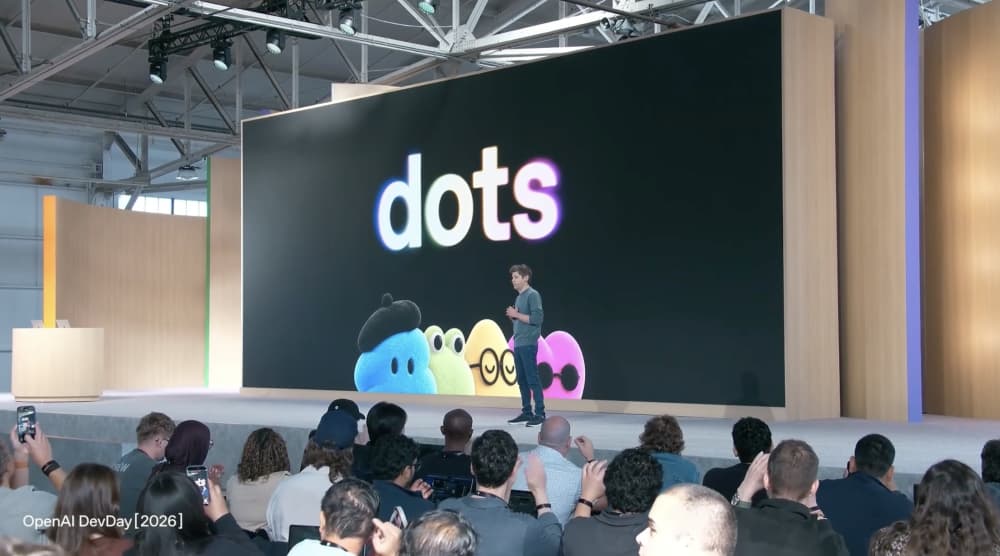
Technically, a dot is Astra with a persistent virtual machine in the cloud. It has its own browser, more than 4,000 connected apps through plugins, memory of a user’s preferences, and the ability to work on multiple projects in parallel without creating a separate thread for each one.
Users can start by creating the main dot, naming and customizing it. Then, the user can set a goal and define the available actions, after which the agent starts performing the work autonomously. Early demos presented by OpenAI show agents managing spreadsheets, booking travel, and even writing code independently.
What makes Dots agents different from typical chatbots is their ability to maintain context and work on tasks over extended periods. OpenAI describes this as “persistent reasoning”: Dots can remember previous interactions, use the outcomes of earlier tasks, and adjust their approach based on what worked or didn’t. Instead of starting from scratch with every conversation, the agent can build on what it has already learned and continue working toward a goal over time.
Users can message a dot in ChatGPT on desktop, web, and mobile, as well as in Slack and Teams. They can also simply call it by voice. OpenAI also announced SMS support will come later. The context is shared across all channels: start a task in ChatGPT, continue it in Slack, and the agent remembers everything. Users can open the dot's computer any time and see what it is doing. With permission, it can also connect to the user’s laptop.
The biggest difference from previous ChatGPT agents is what OpenAI calls proactive research. When you're not working with a dot, it can scan connected apps on its own and look for ways to help. One example from the announcement: an agent of one of the early testers noticed that they had forgotten to issue an invoice, so it prepared the invoice and sent it after receiving the tester's confirmation.
OpenAI is also considering the possibility of combining multiple "dots" into teams to execute more complex tasks.
The first dot is included in Pro and Business Premium plans in supported countries. For Enterprise, Edu, and Healthcare workspaces, OpenAI's Dots feature is available as a beta that is initially turned off by default and must be manually enabled by a workspace administrator. Conversations with it don't consume ChatGPT limits, while tasks it launches in Codex or ChatGPT Work count as usual. Limits for deep work are expanded during the first month. After that, OpenAI says users will be able to purchase additional agents and speed up each one, meaning monetization will be based on the amount of work rather than the number of users.
OpenAI has put a lot of effort into controlling what Dots can do, and the details show it.
Background research runs only through tools with read-only access: in this mode, the agent cannot send messages, change data, or control the browser. Dots can fill in the saved password and log in to websites, but the password isn't exposed to the model as text. Password changes and other sensitive actions are never performed by the agent and always remain under human control.
Everything else is governed by Custom Rules: which actions are allowed automatically, which require confirmation, and which are prohibited. Actions that affect accounts or send data outside the user's environment go through an automatic review against these rules. All background activity is visible in Activity View. If monitoring detects suspicious behavior, such as an attempt to follow instructions injected into a webpage, the agent's work is paused.
This is also how OpenAI positions dots for internal and business use. Inside OpenAI, employees use dots to investigate software bugs reported in Slack and prepare fixes for review. They also use dots to turn new designs into working software prototypes.
For companies, OpenAI announced specialist dots - agents with their own accounts, permissions, and specific areas of responsibility: procurement, invoice processing, email campaigns, support, contracts. For now, they are pilots that OpenAI engineers configure together with customers.
Early feedback is cautious. One early user that tested Dots before the announcement, says the agent quickly became its main way of working with ChatGPT: it handles incoming messages in Slack and email and warns about calendar conflicts in advance. But they aren't ready to recommend it yet: there are issues with permissions, lost messages, browser failures, and unclear boundaries between what the agent does on its own and what it does inside a thread. Their advice is to wait a week or two.
Dots vs. Muse
This comparison is inevitable, as Meta launched Muse three weeks earlier. Even visually, OpenAI went in the same direction: dots have fluffy cartoon avatars and names. But the positioning is fundamentally different.
Muse is an agent running on Meta’s flagship model, Muse Spark 1.3, and is available on phone and web. The agent can order products, schedule doctor appointments, buy tickets, and recently gained a video avatar, its own email address, and the ability to control apps on a Mac. So, it’s more of a consumer assistant for everyday tasks, with a free tier and subscriptions at $20 and $100 per month.
Dots, on the contrary, are work agents running on OpenAI's most powerful model Astra and available only to higher-tier plans. OpenAI is targeting the segment where users are willing to give an agent access to their work accounts.
GPT-6.1 Sol: Almost Astra at One-Fifth the Price
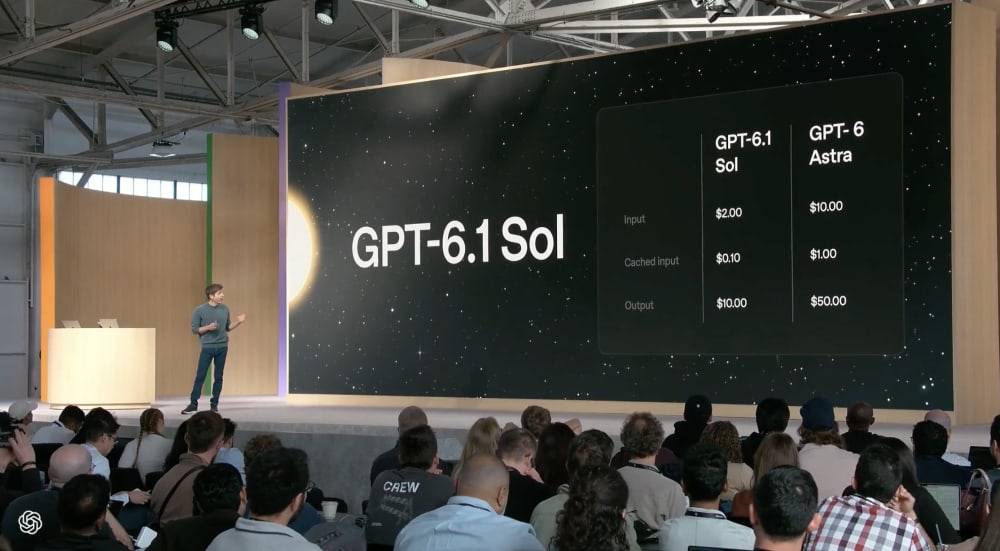
GPT-6.1 Sol is an update to GPT-6 Sol, which was released just one week ago.
The announcement of GPT-6.1 Sol came one day after OpenAI canceled the release of GPT-6.1 Astra, saying the model had failed its internal safety requirements. With Astra 6.1 off the table, Sol became the headline upgrade.
Prices remain unchanged when compared to GPT-6 Sol: $2 per million input tokens and $10 per million output tokens, which is five times less than GPT-6 Astra. GPT-6 Astra, by comparison, costs $10 per million input tokens and $50 per million output tokens.
Here are some figures from the announcement and early independent benchmarks:
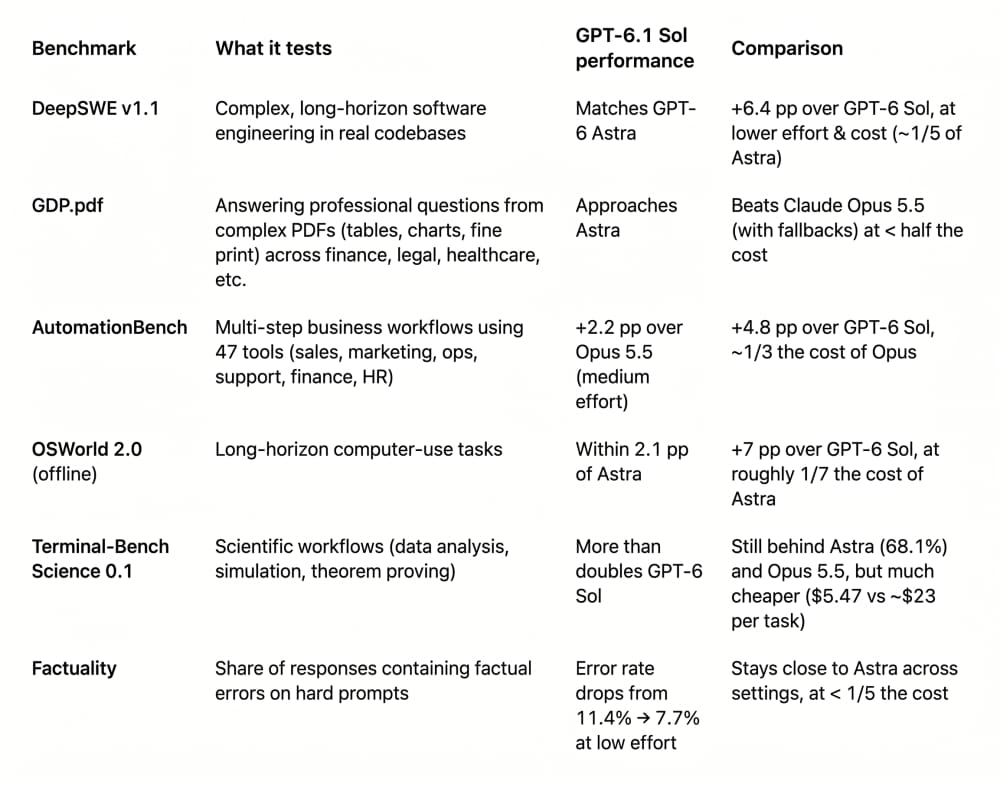
Artificial Analysis found that GPT-6.1 Sol gains 4 points in the Intelligence Index vs GPT-6 Sol, and 5 points vs GPT-5.6 Sol - landing 1 point below GPT-6 Astra. GPT-Sol 6.1 gets much closer to Astra while being substantially cheaper, as its cost per task at maximum effort is $0.72 vs. $3.26 for Astra.
It means that near top-tier models are no longer expensive luxury items. For most daily tasks and developer use cases, Sol will be far more accessible in terms of cost and call limits. It will likely lead to it replacing earlier models and becoming the go-to solution for everyone's daily needs. Besides, the cached-input price has dropped twice compared to GPT-6 Sol. For agents that repeatedly process the same long system prompt and tool history, this is the main cost driver.
GPT-6.1 Sol is available now in ChatGPT Work and Codex for Plus, Pro, Business, Enterprise, and Edu users. It is not yet available in regular ChatGPT Chat, so most everyday chat users won't see it yet. Developers can also access it through the API as gpt-6.1-sol.
Other Announcements
Ultrafast and Pro 500
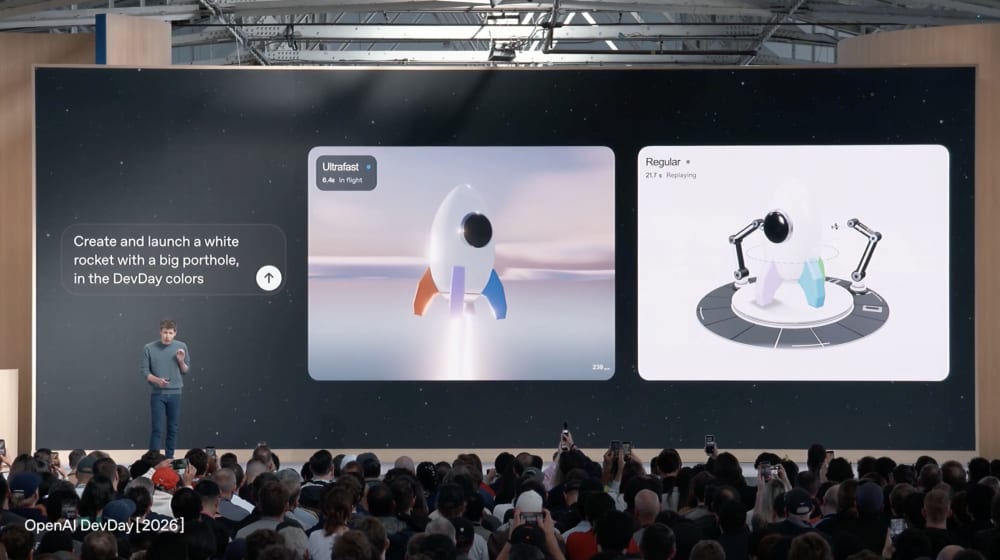
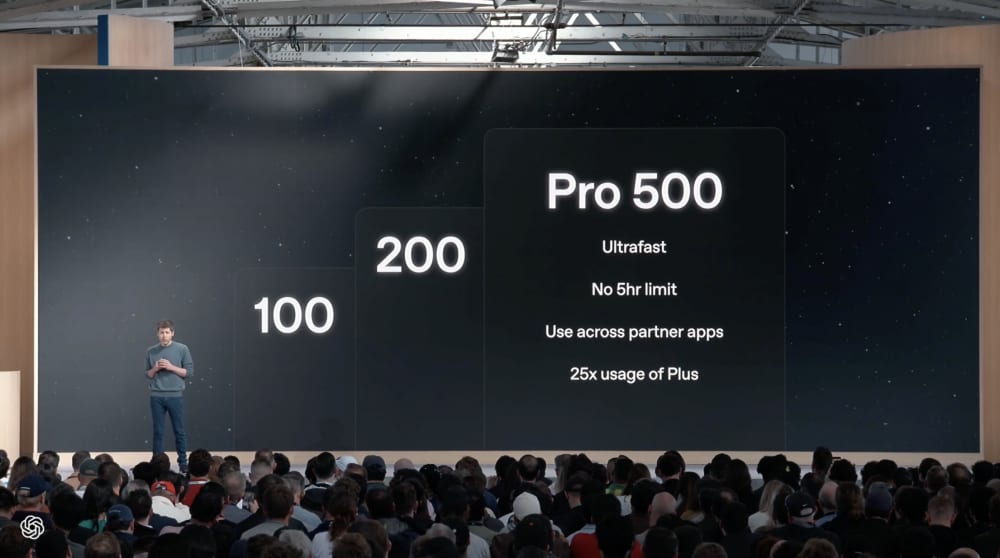
Ultrafast is a premium speed mode of GPT-6 Astra. In the API, it runs up to six times faster than standard Astra, while in Codex and ChatGPT Work, it can be up to eight times faster. OpenAI positions it as an option for tasks where response speed matters more than maximum reasoning depth. It’s available on Pro 500 and Enterprise plans with the Sol version coming soon.
Early testers noted that Astra Ultrafast at around 250 tokens per second is impressive, but it burns through limits at the same speed. During the presentation, OpenAI tried to demonstrate how fast Ultrafast is, but the demo encountered problems several times - an ironic moment for a feature built around speed.
OpenAI has also introduced a new "ChatGPT Pro" tier priced at $500 per month. It is 25 times the limits of Plus, with no five-hour window. The plan is designed for users requiring the highest usage limits and includes exclusive access to Astra Ultrafast.
Spaces and Pages
ChatGPT Space is a shared workspace for people and agents, where you can hand a task to a dot like a colleague. In the keynote demo, OpenAI demonstrated how Dots can work inside a Space, assigning tasks like writing FAQ, providing updates, and reviewing Slack DMs.
Spaces are available on Pro, Business, and Enterprise plans on desktop and web, but not on the $20/month plan. Mobile users can view and share pages, while creating them on mobile is coming soon.
Alongside it came Pages - documents that people and agents can create together, with charts, diagrams, images, interactive dashboards, checklists, and a “keep up to date” toggle. OpenAI has also introduced a dedicated editor for collaboratively preparing presentations.
Privacy and Security
One more announcement is Private Intelligence, which is OpenAI's answer to companies concerned about using AI with sensitive data. It combines zero data retention with automated safety checks designed to work without OpenAI staff seeing the content. Available in API, Codex, and ChatGPT Work on Pro 500 and Enterprise.
OpenAI is also previewing Private Inference, which will process AI requests inside confidential computing environments - protected hardware designed to prevent even the cloud provider from accessing the data. For industries such as healthcare, finance, and law, these controls could make it easier to use AI with highly sensitive information.
More for Codex
Codex CLI now supports voice control and a new /agents view that lets developers monitor and manage multiple agents working on different tasks. ChatGPT also introduced a code review interface with GitHub and GitLab integration.
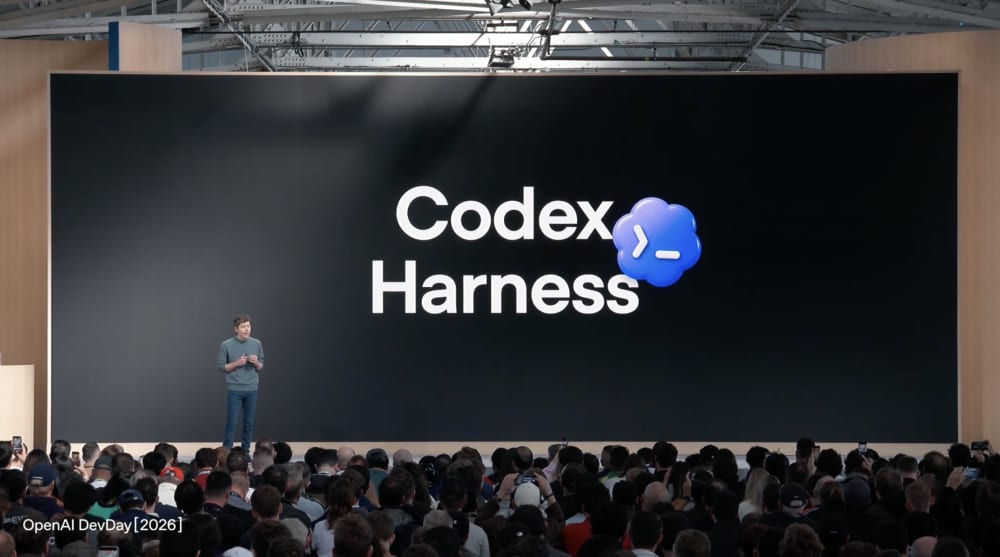
OpenAI also open-sourced the Codex harness - the software layer that lets an AI agent use tools, run commands, and manage longer tasks. The same harness now powers dots, giving developers a look at how OpenAI's agents are built.
Codex Security Cloud takes this further by continuously scanning entire code repositories for security vulnerabilities. It can investigate findings, remove duplicates, and prepare fixes in the cloud, even while the developer's computer is offline.
New Tools for Developers
OpenAI also expanded its developer tools. The company introduced the Decisions API, which is designed for tasks where AI needs to choose from a fixed set of options rather than generate an open-ended response. Developers can send text or images and get back a structured decision, for example, to classify content, route a request, or determine which agent should handle the next step. The model isn't meant to reason through a complex question; it's making a fast, predefined choice that another part of the application can act on. The API is currently in limited preview, with a broader release planned soon.
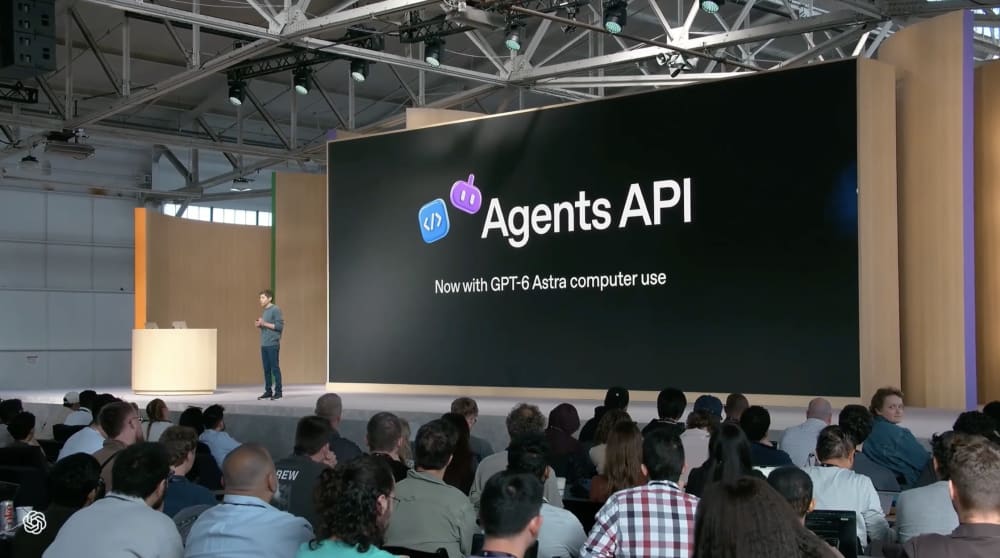
OpenAI also added computer use to the Agents API, allowing developers to build AI agents that can interact with software the way a person would by clicking, typing, navigating interfaces, and completing multi-step tasks. OpenAI runs the underlying infrastructure, so developers don't have to host the computer-use machinery themselves. The capability is available through the API, as well as in Codex and ChatGPT Work for Pro 500 and Enterprise users.
These updates should give developers more options for building systems that can do more than generate text or code, but can also interact with software and take actions in digital environments.
ChatGPT as a Platform
Another area of focus is apps inside ChatGPT. OpenAI is turning ChatGPT into a place where third-party software can run. With its new plugin extensions, developers can build their own tools and make them available directly inside ChatGPT. For example, a company could build a tool that lets users analyze a file, create a design, or manage a business task without opening a separate website. Users will be able to work with these tools without constantly switching between separate services. The tool can have its own interface inside ChatGPT while still working alongside the conversation.
OpenAI is also letting ChatGPT users take their plans into other AI-powered products. With Sign in with ChatGPT, Plus and Pro users can connect their accounts to participating apps and use their existing OpenAI usage allowance there, instead of the app paying for that usage separately. Partners so far include Devin, Notion, Vercel, T3, and others.
Beyond the Product Launches
There is also a broader business story behind these announcements. OpenAI is simultaneously seeking more capital to fund its rapid expansion. Reports on September 29 said the company was discussing a new funding round of at least $30 billion at a valuation of around $1.4 trillion, although the talks are still at an early stage and the terms could change.
That context matters because OpenAI is pursuing an expensive strategy: more capable models, always-on agents, larger computing infrastructure, and deeper integration into business workflows. At the same time, it needs developers and companies to keep building on its platform and generating API usage.
The competition is intensifying, too. Google, Microsoft, Meta, and Anthropic are all investing heavily in AI models and agents. OpenAI therefore needs both the technology and the infrastructure to support it at scale, and the capital to keep building both.
Bottom Line
OpenAI has effectively split its product into two layers. At the top is a subscription costing hundreds of dollars, where an agent lives on its own computer and works around the clock.
The top layer is a bet that people will trust an agent with their email and work accounts. It confirms that AI is evolving from a chatbot you consult into a worker you assign tasks to. At the bottom is a model that nearly matches the flagship while costing five times less. The bottom layer is already changing the economics for everyone building products on top of the API: tasks that required Astra a month ago can now be handled by Sol. Together, these two moves show OpenAI’s strategy clearly: make the most capable agents available to those willing to pay and give access, while making high performance accessible enough that developers and teams no longer need the most expensive model for the majority of their work.


