The browser has always been a tool for finding things on the web. First came search. Then AI started answering questions instead of just returning links. Now it's taking the next step: agents that can browse, click, fill out forms, and complete tasks for the user autonomously.
Tools like Perplexity's Comet and Anthropic's Claude in Chrome, now tightly integrated with Claude Cowork, have moved agentic browsing from demo reels into real-world use. But before you hand an AI browser agent the keys to your workflows, there's a question worth asking: can you actually trust it enough to replace the work you used to do manually?
Not yet. That's the honest answer, and it's not a hedge - it's backed by two hard facts everyone evaluating this category should know before entrusting real work to an agent. The best AI browser agent available today completes roughly one in five realistic, multi-step tasks. And every major agentic browser on the market, including those built by Anthropic, Google, OpenAI, Perplexity, and Microsoft, has already been shown to be hijackable with a single email, with no click required. That's not an argument against the category. It's a category still finding its footing, moving fast, and worth watching closely.
Here's the full picture.
What "AI browser agent" actually means
The terminology in this space is genuinely confusing, so it's worth untangling before anything else.
An AI-powered browser is any browser with AI built into it. Usually it’s a sidebar or chat panel that can summarize a page, answer questions about it, or hold a conversation about what's on screen. An AI browser agent is a specific capability inside that browser: the ability to take actions autonomously, like clicking, filling forms, navigating between pages, and completing multi-step tasks, based on an instruction, rather than just answering questions about content passively.
Not every AI-powered browser is agentic, and some are staying that way on purpose. Dia, the AI-first browser from The Browser Company (now owned by Atlassian), deliberately limits itself to a sidebar that reads and summarizes your tabs rather than acting on them - a calmer, more contained bet than its competitors are making.
Among the products that do act, agent capability shows up in a few different packaging models. One is a dedicated agentic browser, where the agent is built into the browser's core. Perplexity's Comet is the clearest example. A user replaces their existing browser entirely to get it. Opera Neon is another example in the category. It’s a distinct product you download separately from regular Opera, not an agent capability layered into the existing Opera browser.
A second model, used by Google with Gemini in Chrome and Auto Browse, and by Microsoft with Copilot in Edge, is to build agentic capabilities natively into an existing browser rather than ship them as a separate download or extension. Auto Browse, which lets Gemini perform multi-step browser tasks on a user's behalf, has been rolling out since early 2026 and is currently available in preview in the US to Google AI Pro and AI Ultra subscribers. Microsoft first introduced its agentic browser capability as Copilot Actions in April 2025; it was later folded into Browse with Copilot, which is currently rolling out to US consumers as a Microsoft 365 Premium feature.
The third is the agent-as-extension model, where the capability rides on top of a browser a user already uses, without replacing it. The best example in the category is Claude in Chrome - no new browser, just a sidebar and a set of permissions added to Chrome. OpenAI's ChatGPT extension works similarly, though its deeper automation is tied to a companion desktop app rather than being fully integrated into the extension itself. Both are Chrome-only, and neither currently supports other Chromium-based browsers.
The market hasn't ruled on format
One of the standalone browsers built by a major AI lab has already been shut down. It's tempting to read that as proof of the whole category, i.e., that a browser built specifically around an AI agent doesn't hold up. But the reasons seem to be different.
OpenAI launched ChatGPT Atlas in October 2025 and shut it down on August 9, 2026, folding the capability into ChatGPT's desktop app and a Chrome extension instead. But Perplexity's Comet and Opera's Neon are also standalone browsers, launched in the same window, and both are still running. So the lesson isn't "standalone loses."
The factors that may have sunk Atlas aren't necessarily about format. It’s that it never left macOS for its entire ten-month life, while trying to compete with Chrome's roughly 68% global share, and its free tier hid the agent behind a paywall, so free users never saw the thing that was supposed to justify switching browsers in the first place. Comet's free tier included real agent capability and expanded to Android within seven weeks. Neon has never been free at all, but Opera brought decades of existing cross-platform infrastructure and users to it.
The takeaway: no single delivery model, whether it’s a standalone browser, extension, or native integration, has proven itself superior. What the tools can actually do matters more than how they're packaged.
So, what can these tools actually do today?
Benchmark numbers for this category vary wildly depending on what's being measured, and that variance is itself part of the story.
Shorter, more bounded browser benchmarks such as WebVoyager can produce impressive headline numbers. Leading systems now report success rates above 80% on WebVoyager — OpenAI's CUA, for example, reported 87%.
Those results are real, but they measure a narrower problem than “replace a manual workflow” might suggest: completing a defined web task is very different from sustaining a complex, multi-hour business process across changing tools, constraints, and sources of information. Recent research has increasingly focused on exactly that gap, with newer long-horizon benchmarks designed to expose failures that shorter browser tasks can miss.
The more revealing benchmark is OSWorld 2.0, published in mid-2026 by a research team at the University of Hong Kong's XLang Lab in collaboration with several other universities. It was purpose-built to fix exactly the gap described above: it tests agents on 108 long-horizon, realistic workflows - the kind that take a skilled human a median of 1.6 hours to complete, spanning research, finance, compliance, and other professional domains, using real tools like Slack, GitLab, AWS, and legacy business portals rather than toy websites.
Under that benchmark's strict, realistic scoring, the best-performing model, Claude Opus 4.8 with maximum thinking and batched tool calls, completed only 20.6% of tasks in full, with a 54.8% partial score. GPT-5.5 lagged further behind, plateauing near 14%.
The researchers' diagnosis is worth sitting with, because it explains why, rather than just reporting a low number. Agents in this benchmark didn't fail because they couldn't click the right button or write the right code. They failed because they lost track of constraints over a long task, missed new information that arrived mid-task, guessed instead of asking the user for clarification, and skipped verifying their own work, struggling most whenever a task depended on information that wasn't stated up front and had to be recovered from context.
The pattern gets starker as tasks get longer. On tasks under 45 minutes, the leading models manage 20–24% completion. Push past two hours, and completion drops to zero for every model tested. In other words: today's agents can plausibly handle a short, bounded task. They cannot yet be trusted to run an actual multi-hour workflow start to finish without supervision.
The security ceiling
Capability is only half of the "not yet." The other half is security, and it's arguably the more urgent one for a business audience.
At Black Hat USA 2026, security researchers at Zenity Labs disclosed a vulnerability class they call PleaseFix, built around a technique called “Intent Collision”. The core problem: an agentic browser can't reliably tell the difference between what you asked it to do and instructions hidden inside content it reads along the way - an email, a calendar invite, even a comment buried in a social media post. Because the agent operates inside your logged-in accounts with your permissions, a hidden instruction gets executed with your identity attached to it. No click required.
The researchers demonstrated working exploit chains against five major products: Claude in Chrome, Gemini in Chrome, Perplexity Comet, ChatGPT Atlas, and Microsoft's Copilot Edge. The outcomes ranged from data exfiltration to full account takeover to remote control of the victim's machine. In one demonstration, a single malicious email sent to Claude in Chrome, with nothing more than an ordinary "summarize my inbox" request, led to Gmail data theft, unauthorized Google Drive sharing, and takeover of Slack, X, and Claude accounts. Notably, the researchers reported that this chain succeeded even with the browser's "ask before acting" safety mode turned on.
The root cause, as Zenity's researchers describe it, is structural. The same-origin policy is the decades-old browser security boundary that keeps one website from directly reaching into another site's logged-in session. Agentic browsers don't disable that protection directly. Instead, they give an AI agent the ability to read and act across multiple websites using the user's own authenticated sessions. The agent effectively becomes a trusted intermediary between sites that were never designed to trust each other. That's exactly what makes agents useful - they have to read across multiple sources to do real work - and exactly what makes them exploitable: how does the agent actually know which instructions come from you, and which come from a random webpage, email, calendar invite, or social media post it happened to read along the way?
That tension doesn't disappear with a single patch. Individual vulnerabilities can be fixed one at a time, but the more authority an agent has to act across sites and services, the more valuable it becomes, and the more damaging a successful prompt injection can be.
To Anthropic's credit, its own documentation is unusually candid about this trade-off. The company states plainly that prompt injection is the biggest risk facing browser-using AI tools, and that its internal testing, while showing meaningful improvement in newer models, still leaves the chance of a successful attack at non-zero.
Anthropic's own guidance tells users to avoid financial transactions, password management, legal or medical documents, and sensitive company data when using Claude in Chrome, and recommends a separate, logged-out browser profile for anything involving real access. That's a vendor being honest about the limits of its own product, which is worth noting, but it also confirms the underlying story: even the most safety-conscious implementation in the category hasn't closed the gap yet.
What this means for your business, right now
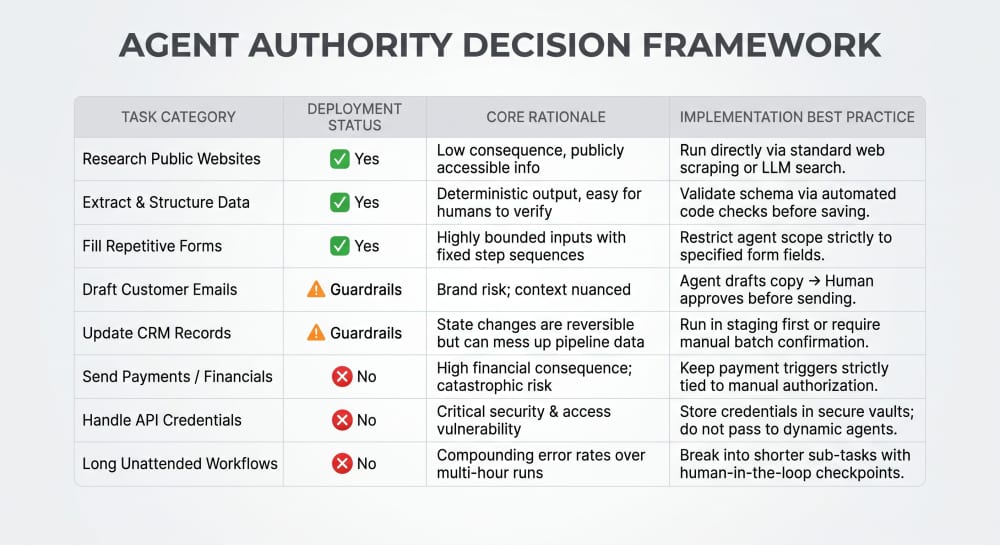
Put the two findings together and a practical framework emerges. The question isn't simply “Can the agent do this?” It's “What happens if the agent is wrong?”
That gives businesses three sensible levels of delegation:
Delegate now: low-stakes, bounded tasks where a mistake is easy to spot and fix like web research and information gathering, summarizing pages or long documents, competitive monitoring, extracting structured data from public pages, and repetitive form-filling on trusted, non-sensitive sites.
Delegate with human approval: tasks where the agent can do most of the work, but a person should make the final call. These are drafting or sending emails, updating CRM records, creating tickets, booking meetings, making purchases, changing cloud or service settings, or publishing content. The agent handles the execution; a human approves the consequential step.
Keep manual for now: anything touching financial accounts or transactions, password or credential management, legal or medical documents, sensitive internal company data, or any workflow you'd want completed correctly and unsupervised for more than about 30–45 minutes.
The dividing line isn't whether an agent can perform the task. It's the cost of being wrong and whether a human has a meaningful opportunity to catch the mistake before it matters.
Where this is heading
The limitations described above reflect where things stand today, not what these tools will ever be able to do. OSWorld 2.0 gives the industry a clearer, harder target to improve against than it had a year ago, precisely because it was built to catch the long-horizon failures shorter benchmarks miss. Security is a harder problem, since the vulnerability is architectural rather than a simple bug, but increased scrutiny from researchers like Zenity, and vendors' own public safety documentation, suggest this is being taken seriously rather than dismissed. The honest framing for 2026 isn't "hype versus reality." It's "not yet, and here's specifically what has to change first": task reliability on workflows that run longer than an hour, and a security model that doesn't have to trade away decades of browser isolation to be useful. Worth watching. Not ready to replace your workflows, but ready to help with parts of them.
If you are assessing whether a browser workflow is ready for automation, talk to ScrumLaunch about agentic AI development.