Companies worldwide that have embraced AI are increasingly discovering the same reality: AI creates new opportunities for productivity, innovation, and growth, but it also becomes a new category of significant expenditure.
Many organizations budget for AI the way they budget for fixed projects: scope it, price it, ship it, and move on. But AI does not stop costing money at launch. It starts there. The bill that follows is usage-linked, and if at first it might seem similar to traditional cloud expenditures, the AI cost model behaves nothing like that.
Traditional cloud costs like servers, storage, and networking are relatively stable and predictable. AI costs can change significantly with usage - longer contexts, different models, agents, and varying workflows all affect the cost of each interaction. What seems affordable with a few hundred users can turn into a significant expense once thousands of people start using the system daily.
According to Harness’s 2026 report, 72% of organizations experienced an unexpected AI cost spike or bill in the past year. And although per-token prices have fallen sharply in recent years, with some major models seeing cuts of 60% or more (for instance, Anthropic’s 67% cut to Claude Opus pricing in late 2025), total AI bills keep climbing. The reason is that the workflows are getting more and more complex, and they multiply the number of tokens consumed per task faster than unit prices fall.
Brendan Foody, the CEO of Mercor, an AI-powered recruiting and labor marketplace platform, has predicted that AI could become one of the fundamental operating expense categories for companies, comparable to or even exceeding personnel costs.
None of this means AI spend is unmanageable. It means that to make AI economics predictable enough so the product can scale without destroying its margins, it needs FinOps designed specifically for AI. FinOps for AI is the practice of tracking AI spend by feature, team, or workload, making costs visible and owned so teams can identify opportunities to optimize them.
The rest of this piece looks at how FinOps for AI can help you track AI spending, understand what drives it, and control costs as usage grows.
Where AI costs actually come from
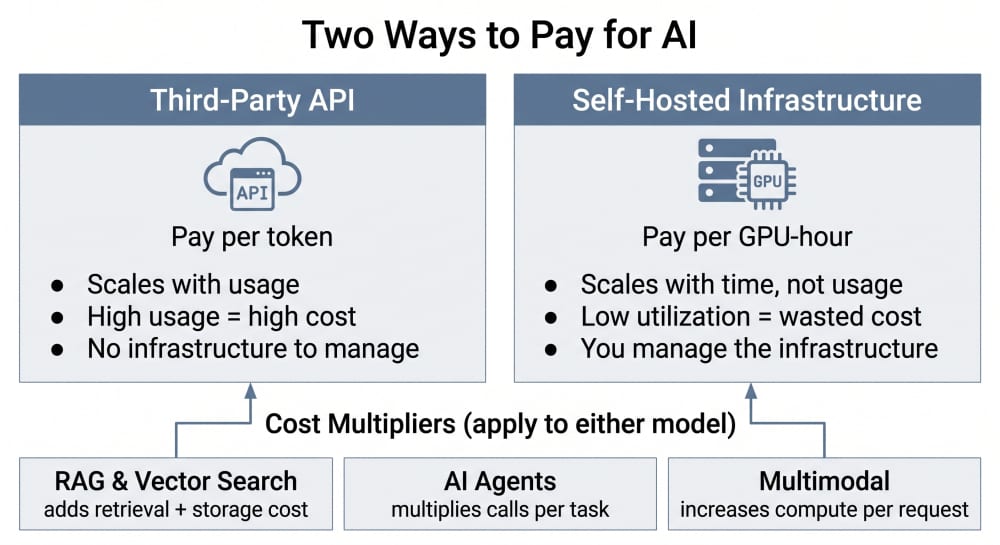
Before you can control AI spending, you need to know what you're actually paying for. Underneath all the complexity, there are two major billing models.
1. Third-party API (inference-as-a-service)
With inference-as-a-service, you run AI models on a provider's infrastructure. You don't have to manage that underlying infrastructure, but your bill scales directly with usage. You typically pay based on the number of tokens processed, so total costs depend on request volume, context length, and the model you use. A request sent to a larger, more capable model can cost considerably more than the same request handled by a smaller one. Providers such as OpenAI, Anthropic, and Google typically charge separately for input and output tokens.
2. Self-hosted infrastructure
Here, you pay for the infrastructure needed to run the model yourself. Costs come from GPU compute, storage, and networking. In many cases, you pay for GPU instances by the hour whether or not they're actively processing requests. That makes utilization a critical cost factor: expensive hardware sitting idle for long periods is one of the fastest ways to waste an infrastructure budget.
The API model makes high usage expensive, while the self-hosted model makes low utilization expensive. But neither model is inherently more or less predictable. What makes both hard to forecast is a set of cost multipliers that apply regardless of which model you're running. Here are the main cost multipliers that apply to either model:
RAG and vector search
They add a cost layer on top of the base model call: embedding generation, vector database storage, database queries, document processing, and often additional model calls. It improves response quality, but it is not free, and it applies the same way whether the underlying model is a paid API or something you're hosting yourself.
AI agents
AI agents are the hardest to budget for, because a single user request can trigger a whole chain: planning, search, tool call, retrieval, reasoning, another tool call, final response. A simple chatbot might make one model call per request. An agent might make a dozen. If every step in that chain involves a model call, the cost of one completed task multiplies respectively, which is why agentic systems need to be monitored by workflow and outcome, not by individual API request.
Multimodal workloads
Inferences involving multimodal workloads increase compute per request regardless of billing model. Images, audio, and video typically require substantially more computation than text. A product that started as a text assistant can have a very different cost structure the moment it adds image analysis or voice.
Which billing model you're in decides where your FinOps decisions have to focus - usage caps and per-token monitoring for the API model, utilization tracking for self-hosted. The multipliers are what make forecasting hard inside either one.
Make AI Costs Visible
Knowing where AI costs come from is only the first step. You can't manage AI spending if you only see the final invoice. The monthly invoice from your AI API provider or your infrastructure provider tells you what you spent, but it rarely tells you why, or whether that spend was efficient. To answer that, you need to connect infrastructure and inference costs to the workloads, products, and usage patterns that generate them.
List everything the company is paying for or using that involves AI, including experimental tools nobody's formally adopted. At minimum, separate spending by model, product, environment, and workload.
For instance, instead of seeing: OpenAI bill: $12,000, you want your system to record something more like:
- Support chatbot → GPT model → 50,000 calls → $4,000
- Document summarization → another model → 20,000 calls → $2,000
- AI search → GPT model → 30,000 calls → $6,000
Build a cost dashboard specific to AI usage. Review it weekly or biweekly, since AI spend moves too fast for a quarterly check-in to catch a problem while it's still small.
Make the AI bill explain itself. Don't just know: "We spent $20,000 on AI." Know: "We spent $20,000. $7,000 came from the support product, $8,000 from AI search, and $5,000 from agent workflows." This turns a bill from a financial report into something Engineering and Product can actually act on. If one workflow suddenly costs 40% more, you can investigate what changed: a larger model, longer context, more agent steps, higher traffic, or an inefficient retrieval pipeline.
For self-hosted models, the same principle applies even though there may be no per-request invoice. Allocate GPU, storage, and networking costs to the workloads consuming them, and track utilization alongside them. Otherwise, an expensive GPU cluster can look acceptable simply because its total monthly cost hasn't changed.
AI Unit Economics Matter More Than Raw Cost
Once spend is broken down by feature, the next question is whether each number is good or bad. That's what a rate tells you that a total can't.
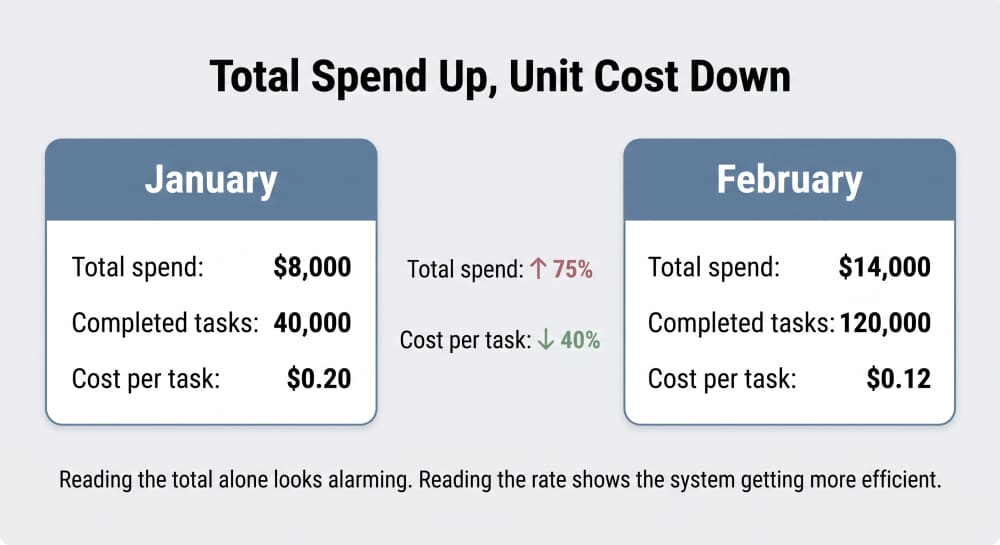
Take the same invoice two ways: $8,000 in January for 40,000 completed tasks is $0.20 per task; $14,000 in February for 120,000 completed tasks is $0.12 per task. The total rose 75%. The unit cost fell 40%. Read as a total, February looks alarming. Read as the rate, it's the system getting more efficient as it scales, and that's the only version of the number worth reacting to. You need both numbers, but the unit cost tells you whether the underlying economics are improving.
Start with one unit-economics metric: cost per meaningful unit, at the highest level your product can reliably track:
-
Average cost per request: total spend ÷ requests served. The baseline, available to any team with basic logging. For example, $0.03 per API request.
-
Average cost per completed task: total spend ÷ tasks actually finished, not calls made. Necessary the moment agents or multi-step workflows are involved, since request count stops meaning much when one task can take one call or twelve. For example, $0.20 per research task.
-
Average cost per resolved outcome: total spend ÷ the unit the business actually cares about: a resolved support ticket, an active user, a shipped code change. For example, $0.15 per resolved support ticket. This is the number to bring to a non-technical stakeholder because it's the one they can weigh directly against value.
Pick the most meaningful version your tracking actually supports: outcome over task, task over request. You don't need to report all three. That one metric gives you a much better signal of whether a rising bill reflects inefficiency or simply more usage.
The goal is not simply to reduce the cloud bill. It is to understand the relationship between usage, performance, cost, and business value.
Assign ownership
Visibility without accountability doesn't change behavior. Every AI service needs a named owner - a team or a person responsible for its cost. A team lead who sees their AI workflow costs $5K a month in inference is far more likely to question whether that spend is justified than one who never sees the number at all.
Put a tagging taxonomy in place: a shared set of labels - team, project, environment, cost center, attached the same way every time. For example, a call from the support chatbot gets tagged “team: support”, while a call from the search feature gets tagged “team: search”. It lets you filter total spend by any of them later, instead of seeing one undifferentiated number. Run a monthly report on untagged spend so nothing slips through unlabeled and invisible.
Put Budgets and Guardrails in Place
Guardrails keep a small problem from becoming a large bill. Set spending and usage thresholds for each product or workload, then trigger alerts when they are exceeded. For instance, assign a budget per team or project, configure alerts at 75% and 100% of each threshold, and name a specific responder for each alert instead of routing it to a shared inbox nobody owns. The exact limits will vary, but useful controls can include token or request budgets, rate limits, maximum agent steps, and alerts for unusual increases in cost per task. Review budget against actuals monthly, since workloads mature faster than most budget cycles account for.
These controls are particularly important for agentic systems. AI usage can grow quietly, especially once automation or scheduled workloads are running unattended. And while a conventional application may have a fairly predictable relationship between one user action and one backend operation, an agent can decide to perform additional searches, tool calls, or model calls based on what it encounters. Without limits, a workflow can consume far more resources than its original request suggests. The goal isn't to prevent the system from spending money. It is to make unexpected spending visible early enough to do something about it.
Optimize To Reduce Waste and Align Spend With Value
Once spend is visible and owned, the work shifts to making sure it's justified and controlled. Three concrete levers do most of this work: model routing, prompt and context size discipline, and caching. For self-hosted deployments, a fourth lever, specifically infrastructure efficiency, applies on top of these.
Model routing
Not every request needs the most capable model available. Route simple classification, extraction, summarization, or routine support tasks to smaller and cheaper models, while reserving more expensive models for tasks that actually benefit from them. A simple routing layer that classifies incoming requests before choosing a model can meaningfully change unit economics without changing product quality. The goal isn't always choosing the cheapest model - it's using the least expensive model that can still meet the required quality bar.
Prompt and context size discipline
AI applications often send far more context than users realize. A visible 100-token user message can turn into a 9,000-plus token request once system instructions, conversation history, and retrieved documents are added in. Monitoring average input and output tokens, context size, and retrieved-document volume by feature turns prompt design into a cost lever, not just a quality one. Reduce unnecessary context, avoid sending the same information repeatedly, and review agent workflows for redundant steps. In RAG systems, better retrieval can reduce the amount of information that needs to be passed to the model in the first place.
Caching
Repeated system instructions, frequently accessed documents, and common queries don't need to be reprocessed every time. Prompt caching, semantic caching, and embedding caching can meaningfully cut repeated computation. Caching needs to be used carefully, though, since stale or incorrect cached results create their own quality problems.
Infrastructure efficiency (self-hosted only)
For self-hosted deployments, the levers above still apply, but there's an additional one: the hardware itself. Monitor GPU utilization, batching, concurrency, and scaling behavior. Paying for a GPU that spends much of its time idle can outweigh whatever savings come from running an open model yourself.
The important distinction across all four levers is that cost optimization should not mean simply using less AI. The objective is to reduce the cost of producing the same useful outcome.
Tools That Support These Practices
A growing set of tools exists specifically to support this discipline, and most teams don't need to build it from scratch.
-
Provider dashboards from OpenAI, Anthropic, and others offer basic visibility and serve as a free starting point.
-
AI gateways such as LiteLLM, Portkey, Helicone, or TrueFoundry sit in front of model calls. They track tokens and cost in real time, enforce budgets, enable caching, and can route requests to cheaper models.
-
AI observability platforms such as Langfuse and LangSmith trace individual model calls and AI workflows, giving teams visibility into token usage, costs, latency, and performance.
-
Broader FinOps platforms like Finout, Vantage, CloudZero, and similar connect AI spend with the rest of the cloud bill and support allocation by team, product, or customer.
For teams early in their journey, a practical combination is often an open-source gateway such as LiteLLM paired with an observability tool like Langfuse. This delivers useful visibility and control at low cost and can scale as needs grow.
Conclusion
AI delivers significant value, but uncontrolled inference costs can quickly erode margins and limit how far organizations are willing to scale usage. FinOps for AI isn't about minimizing the cloud bill at any cost and not about restricting innovation - it is about making costs visible, predictable, and connected to business outcomes. The practices and tools already exist. Organizations that adopt them early can grow AI usage with confidence. Those that delay often discover the problem only after the bills have already become painful. The goal is not to use less AI. It is to make every useful outcome cost less to produce.