If you’re trying to choose between them, this article breaks down the differences so you can easily pick the tool that fits your needs.
What Are Make, n8n, and Zapier
Zapier is the most beginner-friendly tool in our list. It became the default choice for no-code automation by optimizing for one thing above all else: simplicity. It operates on a trigger-action model: when something happens in one app (the trigger), Zapier automatically performs an action in another. For example, "When I receive a new email in Gmail (trigger), add the corresponding note in my Airtable (action)." The entire process can be set up in minutes through an intuitive interface.
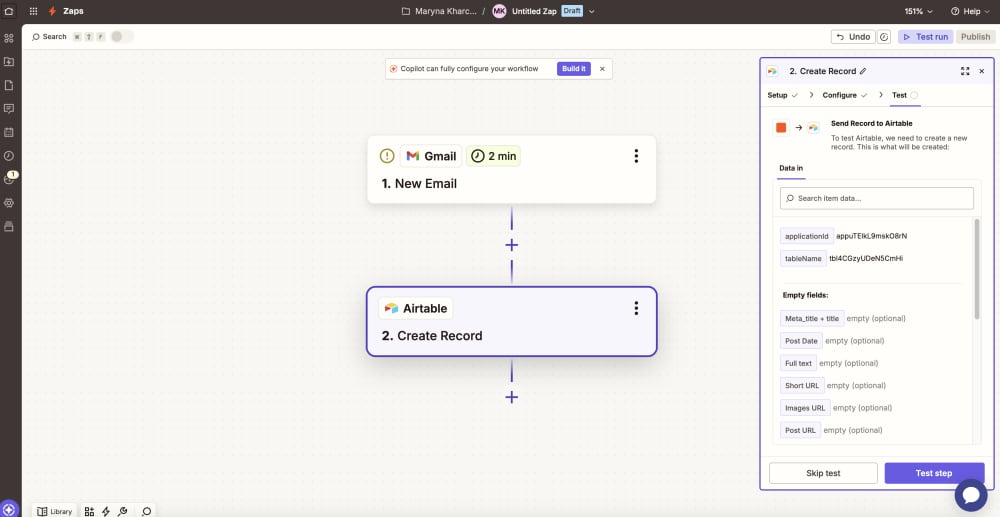
Setting up such automation is extremely simple: select a trigger app, define the trigger condition, then select an action app and specify what should happen. This simple “if this, then that” (IFTTT) logic makes it incredibly easy to understand and use for non-technical teams who need something running in an hour.
Zapier’s biggest advantage is the breadth of its ecosystem. With 9,000 supported integrations, it can connect to almost any mainstream business tool without additional development work. That flexibility makes it particularly attractive for teams that want to automate processes quickly rather than spend time building infrastructure.
The tradeoff is that Zapier is optimized for simplicity first. As workflows become more sophisticated, involving complex logic, multiple branches, or higher volumes of activity, the platform starts to feel restrictive. The pricing model can also become a significant factor against the tool, especially when automations scale beyond basic use cases.
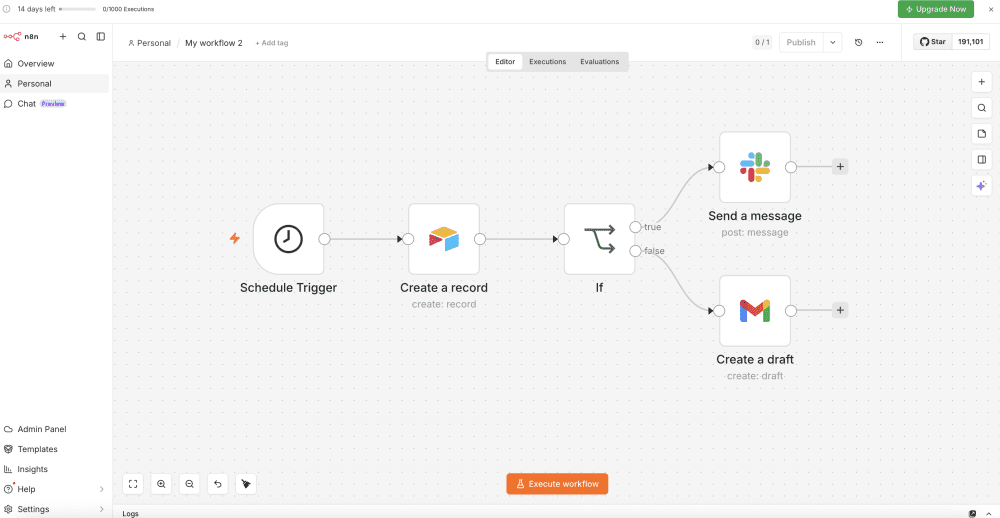
Make (formerly known as Integromat) is built around visual workflow design. Unlike the linear Zapier presenting automations as a sequence of steps, Make allows users to create complex multi-step scenarios with branching scripts, add conditional logic, filters, process data in more detail and even execute JavaScript code for more complex data processing.
After logging in, users create a new scenario, add modules for each step of the workflow, and connect them in the desired sequence. It's similar to assembling a construction set, where each element performs a specific function. This approach creates a strong middle ground between simplicity and flexibility. Make is capable of handling significantly more complex logic than Zapier while remaining approachable for non-developers who are comfortable thinking in systems and workflows. It also tends to offer more automation capacity for the same budget, making it an attractive option for teams running larger or more sophisticated processes.
The tool has a steeper learning curve than Zapier. While it is more visual and powerful, concepts like routers, iterators, aggregators, and data mapping take time to master.
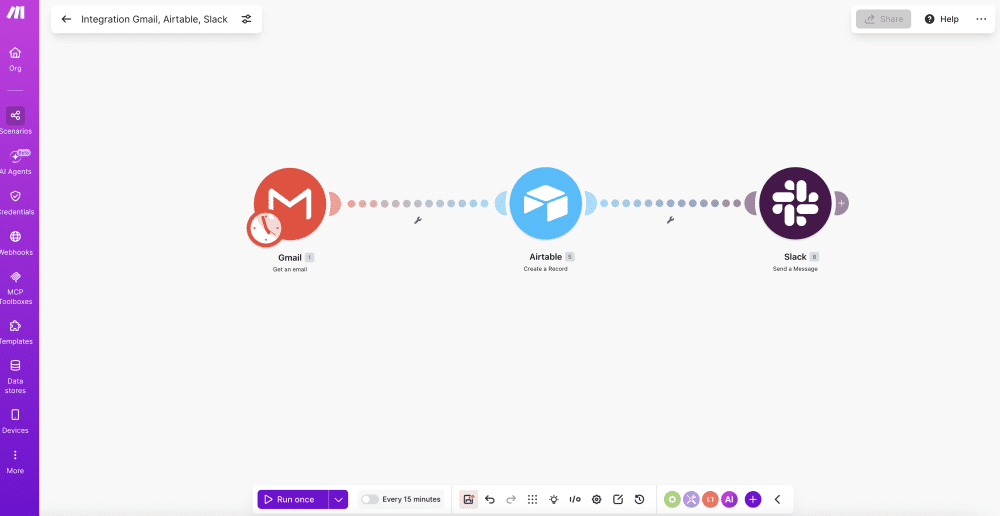
N8n takes a fundamentally different approach. Instead of optimizing for simplicity, it optimizes for flexibility and control. Workflows are built using a node-based architecture where every step, condition, transformation, and integration can be customized. Rather than guiding users through predefined paths, n8n gives them the building blocks to design workflows however they want. Complex branching logic, custom data processing, and advanced integrations are all first-class capabilities rather than edge cases.
This flexibility extends beyond the visual editor. Users can incorporate custom code, build their own integrations, and adapt workflows to requirements that would be difficult or impossible to implement in more restrictive platforms.
n8n stands out from its competitors because it's an open-source tool that can be installed on your own server. While the tool also offers a managed cloud version, organizations can run it on their own infrastructure for free. This local setup makes it the choice for developers and data-sensitive organizations that want full control over data, security, and long-term costs.
n8n demands a stronger understanding of how workflows, data, and integrations actually work. At the same time, while the tool requires some technical setup, it has a clear visual workflow editor. For teams willing to invest that time, it offers a level of customization and ownership that few automation platforms can match.
Comparing Zapier, Make and n8n
Ease of Use & Learning Curve
Zapier, Make, and n8n are not just different in capability - they are fundamentally designed for different types of users. The real distinction here is not features, but how quickly a team can go
from “idea” to “working automation.”
Zapier is built for immediate usability. The interface is intentionally linear and guided, reducing automation to a simple “if this, then that” flow. If a user can describe a process in plain language, they can usually build it in Zapier without needing to understand automation concepts underneath. This makes it highly effective for marketing, sales, and operations teams that need autonomy without engineering support.
Make sits in the middle and leans into visual thinking. Its drag-and-drop canvas makes complex workflows easier to understand once they grow beyond simple linear flows. It introduces more advanced concepts like routers and data transformations, which require some learning but unlock significantly more control. This makes it well-suited for “power users” - people who are comfortable thinking in systems and logic, even if they’re not developers. The result is a steeper learning curve than Zapier, but a more scalable mental model once it clicks.
n8n is the most powerful and also the most technical of the three. Its node-based system gives full control over how data flows, but it requires a stronger understanding of APIs, logic, and system design. While learning the tool requires effort, template libraries and AI-assisted workflow generation now help users get started faster by generating initial structures from plain-language prompts.
Integration Ecosystems
Zapier’s key advantage is scale. With 9,000 integrations, it covers almost every mainstream SaaS tool used across marketing, sales, operations, and finance. In practice, this means that if a tool exists in the modern SaaS ecosystem, there’s a very high chance Zapier already has a ready-made connector for it. Setup is fast, and users can go from idea to working automation in minutes. Still, you should keep in mind that most integrations only expose the most common triggers and actions, meaning you’re working with a simplified layer of the underlying API rather than full system capability.
Make sits in the middle. Its integration catalog is smaller than Zapier’s, it offers about 3000 native integration apps, but it still covers all major business tools most teams rely on. The key difference is how those integrations are used. Make provides more flexibility in data mapping, transformation, and flow control through its visual scenario builder. It makes it better suited for real-world workflows where data doesn’t move in a straight line and logic becomes more complex over time.
n8n takes the opposite approach. The number of integrations is smaller, but the focus shifts entirely to extensibility and control. It has over 400+ native nodes plus a strong community library, but its real power comes from the HTTP node and custom code, which effectively lets you connect to almost any API or service. Instead of limiting users to predefined actions, n8n allows direct API calls, custom logic, and code-level customization inside workflows. If something isn’t available out of the box, it can usually be built rather than waited for. The result is a system designed for depth rather than convenience - fewer plug-and-play connectors, but significantly more flexibility when you need to go beyond standard use cases.
Advanced Capabilities
Once you move beyond basic automations, the differences between these platforms become much more structural. This is where workflows stop being simple linear sequences and start behaving like systems.
Zapier supports basic branching and conditional logic, but it remains relatively constrained. Paths exist, but they feel more like extensions of a linear flow than true decision trees. The same applies to customization - code steps exist, but they are limited and not designed for heavy logic.
Make handles complexity significantly better. Its visual routing system makes conditional flows and multi-branch logic intuitive, and it generally strikes a strong balance between usability and control. You can build sophisticated workflows without leaving the visual layer, which is where it fits most teams well.
n8n is in a different category entirely. It is built for full control over workflow logic, including deeply nested conditions, complex branching, and system-level decision trees driven by real-time data. Custom code is not an exception here - it’s part of the core model, with full JavaScript execution available inside workflows.
The same pattern applies across other advanced capabilities. Error handling in Zapier is mostly abstracted and automatic. In Make, it is configurable but still visual. In n8n, error handling becomes a design choice - you explicitly define how systems should behave when something fails. Even something as basic as database connectivity shows the split. Zapier and Make stay mostly within the boundaries of SaaS tools and spreadsheets. n8n goes deeper, allowing direct interaction with databases, APIs, and backend systems.
At this level, the difference is no longer about convenience. It’s about control. Zapier is enough for lightweight automation. Make is strong for structured operational workflows. n8n is what you use when workflows start behaving like infrastructure
Pricing
The biggest pricing differences aren't in the monthly subscription cost. They're in what each platform considers billable work.
The fees are the following for Zapier:
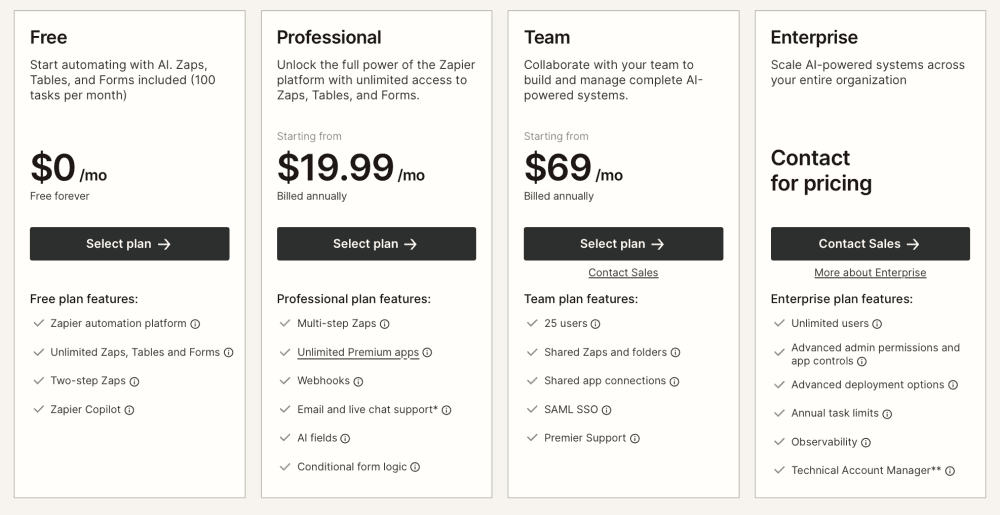
So, there is a free plan for 100 tasks per month. Paid plans start at $19.99/month for 750 tasks, while 1500 tasks already cost $39. Their pricing model is straightforward: every action inside a workflow consumes a task, so costs tend to scale alongside usage - the more steps you add and the more often a workflow runs, the faster task consumption grows. The simplicity makes costs easy to understand and it works well for simple automations but can become expensive as workflow volume grows. For example, a workflow with one trigger and five actions uses five tasks every time it runs. If that workflow runs 1,000 times per month, it consumes 5,000 tasks. At this volume, you would likely be on Zapier’s Professional costing roughly $89/month if you pay annually.
Make uses an operation-based pricing model that is conceptually similar to Zapier's task system. Every action within a workflow consumes operations, so more steps and more executions still translate into higher usage.
The fees are the following for Make:
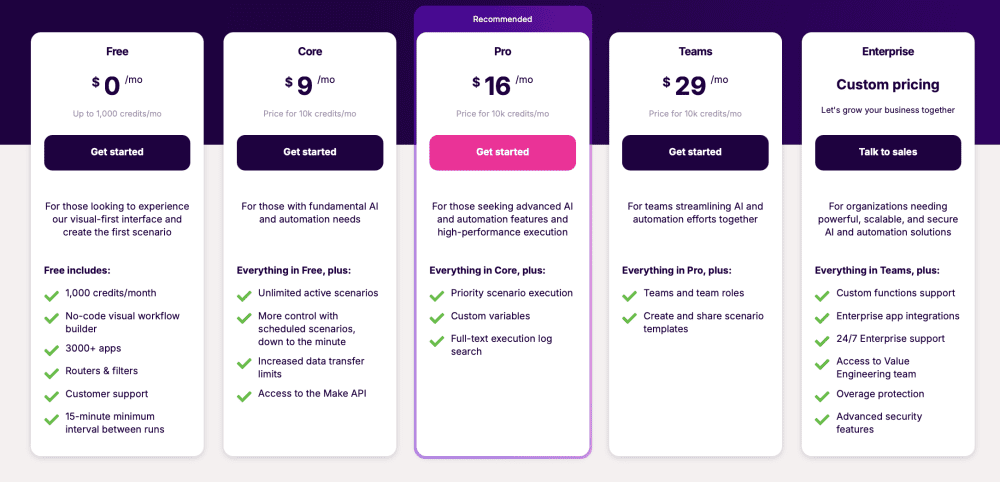
So, there is a free version that includes 1,000 monthly operations. Paid plans start at
$9/month for 10,000 operations, while 20,000 operations costs $16/month. The difference between Zapier and Make pricing is in economics. Make provides significantly more usage capacity. The same workflows that quickly consumed Zapier’s task quota had a minimal impact on Make’s limits, making it a strong middle ground between cost and capability. For example, with the same 5,000 operations as in Zapier, in Make you would comfortably stay within the Core or Pro plan, which costs around $9–$16/month if billed annually. This makes Make significantly more cost-effective for medium-to-high volume workflows.
N8n approaches the problem differently altogether. Its self-hosted version is free, and even its cloud plans charge per workflow execution, not per steps inside a workflow. That distinction becomes extremely important at scale. Complex workflows that process large volumes of data can remain surprisingly cost-effective because you're paying for outcomes rather than every step along the way.
So, the fees are the following for n8n:
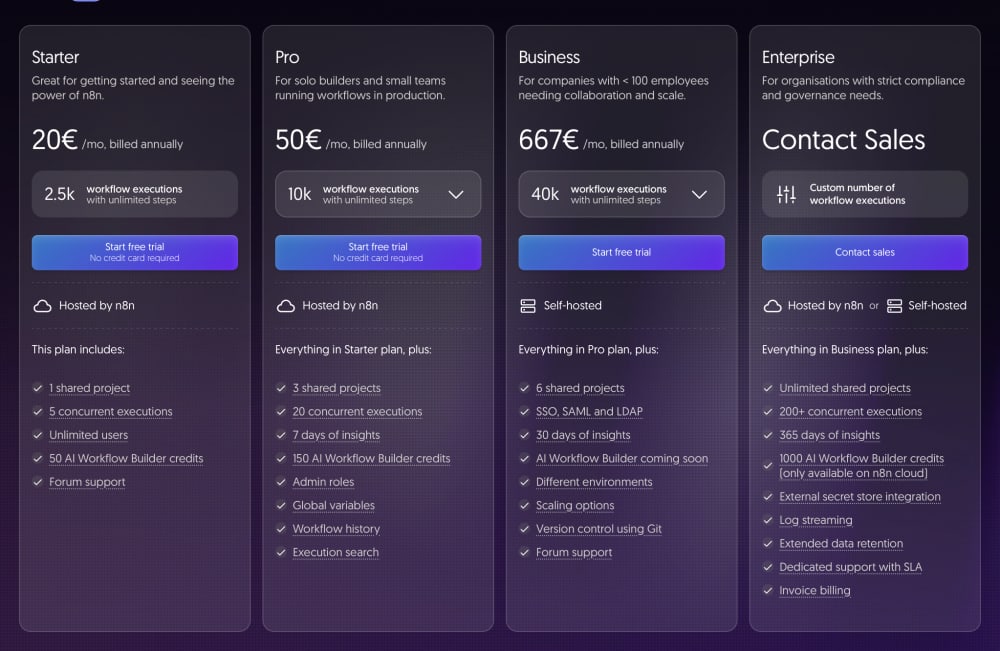
A cloud Starter version is €20/month for 2,500 workflow executions. A cloud Pro version is €50/month for 10,000 workflow executions. For example, the same workflow (one trigger + five actions) that consumes 5,000 tasks in Zapier would only count as 1,000 executions in n8n - because n8n charges per full workflow run, not per individual step. At 1,000 executions per
month you will stay at n8n Cloud Starter for €20/month.
So, the cheapest platform depends less on the base monthly fee and more on how your workflows are built and how much volume they handle. For simple automations, the difference may be negligible. For high-volume or complex workflows, the economics can look completely different.
n8n now also offers paid licenses you can apply to your self-hosted instance if you need advanced enterprise features like SSO (SAML/LDAP), advanced scaling (queue mode, multi-main, etc.), audit logging, longer retention, more concurrent executions, official support, etc.
AI Functionalities
This is where the gap between the platforms becomes most obvious. All three tools now include AI features, but they are not built at the same level of depth or flexibility.
Zapier treats AI as a set of simple, accessible actions. You can summarize text, classify inputs, or generate basic outputs directly inside workflows. The focus is on lowering the barrier to entry, making AI usable without technical setup. The limitation is that each AI step is essentially a single request, which keeps things simple but restricts complexity.
Make offers more practical flexibility. It integrates well with major AI providers like OpenAI and Claude, allowing users to embed AI into multi-step workflows. It’s a solid middle layer - capable enough for real use cases, but still designed for accessibility rather than deep system design.
n8n operates on a completely different level. It is built as an AI-native automation platform, with extensive support for advanced AI workflows, including LangChain-based architectures and a large set of AI-focused nodes. It enables more complex patterns like multi-step agents, RAG pipelines, and systems that combine reasoning, memory, and tool use across multiple steps.
In practice, n8n is the only one of the three that can reliably support advanced AI automation beyond isolated prompts. Zapier and Make can integrate AI into workflows. n8n can build AI systems. For anything serious in AI automation in 2026, n8n is effectively in a different category.
Which Tool Should You Actually Choose?
At some point, the comparison stops being theoretical and becomes a practical decision. Each of these tools is optimized for a different level of complexity, technical comfort, and long-term scalability.
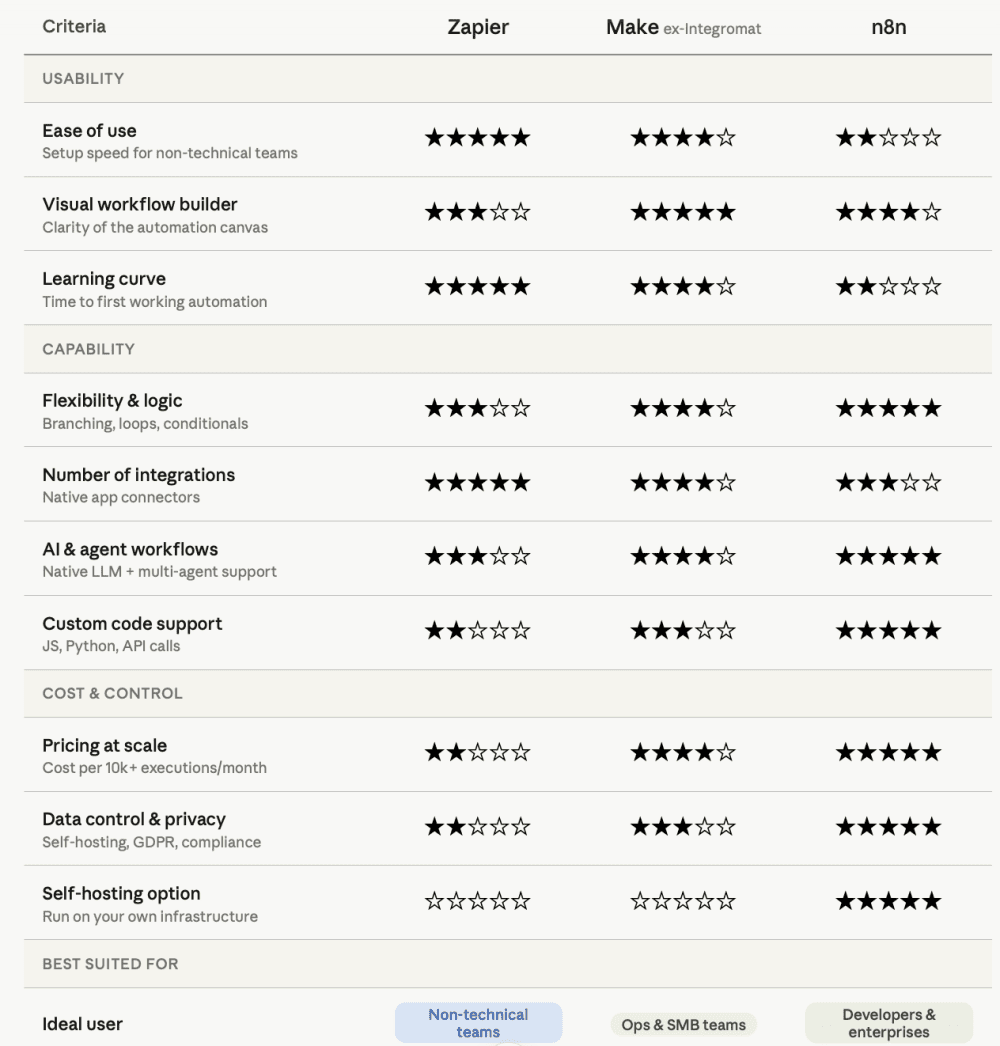
Zapier is the right choice if you want speed and simplicity above everything else. It works best when you're new to automation, need to connect common SaaS tools quickly, and prefer not to think about underlying logic or system design. You pay for convenience, and in return you get the fastest path from idea to working workflow.
Make fits best when you need more flexibility without moving into a fully technical environment. It’s a strong middle ground for users who have outgrown simple automations but still want to stay within a visual, no-code workflow builder. For many small and medium-sized teams, this is the point where capability and usability are balanced.
n8n makes sense when control, privacy, and scalability start to matter more than convenience. It’s the right tool for technical teams, complex workflows, or situations where you need deep customization and direct control over data and infrastructure. It also tends to become more cost-efficient at higher volumes, especially when workflows move beyond basic automation patterns.
Many teams actually use a hybrid approach: they rely on Zapier or Make for quick SaaS wins and simple automations, while turning to n8n for core/internal workflows, sensitive data, or advanced AI agents. This combination gives you the best of speed, usability, and deep control.
Bottom Line
Automation tools like Make, n8n, and Zapier can significantly improve the efficiency of your work and business. Zapier occupies the premium, ease-first tier with the largest app ecosystem. Make sits in the middle - more powerful than Zapier, more accessible than code, and considerably cheaper at equivalent volumes. n8n has grown from a niche developer tool into a serious enterprise alternative that offers maximum control and flexibility at zero cost (excluding hosting). Don't be afraid to experiment - many users start with Zapier for simple automations, then move on to Make or n8n as their needs grow.
Self-hosting n8n moves the work from a subscription line to an engineer, and that engineer is usually a Node developer. Ours run the queues and retries behind products that cannot afford to lose a job.