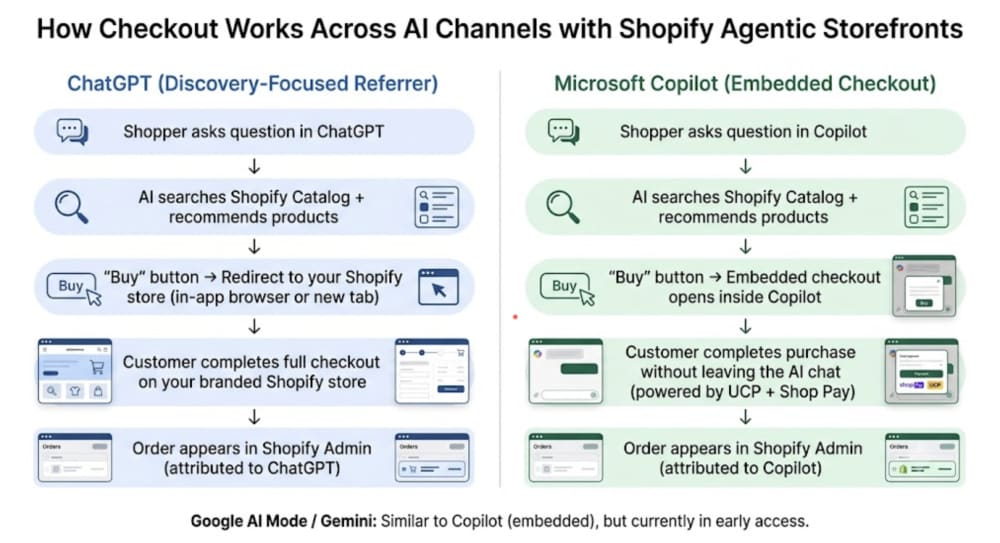
The mechanics: a shopper asks ChatGPT something like "find me a waterproof backpack under $80 that ships fast." The AI agent searches across connected merchant catalogs, evaluates options against the query, and returns product recommendations with prices, availability, and reviews - all inside the conversation. When the shopper is ready to buy, they either complete the purchase directly in the chat or get redirected to your store checkout. They may never open your homepage.
Two technologies make this possible on Shopify's end. The first is Shopify Catalog - a centralized system that structures and syndicates your product data (titles, descriptions, images, pricing, inventory) to AI platforms in real time. The second is the Universal Commerce Protocol (UCP), an open standard Shopify co-developed with Google that defines how AI agents transact with merchants. UCP is the reason a single Shopify setup can route to ChatGPT, Copilot, and Google AI Mode without separate integrations for each.
One distinction matters here: not all channels work the same way. ChatGPT currently acts as a discovery-focused referrer - customers complete their purchase on your online store in an in-app browser or new tab. Copilot offers embedded checkout, where the customer never leaves the AI interface. Google AI Mode and Gemini also support embedded checkout, although Shopify's integration with these channels remains in early access for eligible merchants.
Why this matters right now
The numbers Shopify published at the end of 2025 are hard to ignore. AI-driven orders on Shopify grew 15x year-over-year in 2025. AI-driven traffic to merchant stores grew 8x since January 2025. McKinsey's 2030 projection for the global agentic commerce market sits at $3 to $5 trillion - though that figure covers the entire industry, not Shopify specifically.
What the statistics don't capture is the structural shift underneath them. Traditional ecommerce discovery looks like this: a customer runs a search, clicks a result, lands on your store, browses, maybe converts. Every step is a drop-off point. Agentic commerce compresses that to two steps: describe what you want, accept a recommendation. The intent that arrives through an AI channel is pre-qualified in a way cold search traffic rarely is.
There is also a first-mover dynamic that won't last. The merchants who optimized their catalogs when ChatGPT Shopping launched in early 2026 are already showing up in conversations their competitors are missing. That advantage narrows as more merchants catch up and the channel matures. The competitive cost of waiting is real and gets higher every month.
How to verify and set up your store
Before anything else, confirm your store qualifies. Agentic Storefronts are available to Shopify merchants with products eligible for Shopify Catalog. To appear in supported AI channels, your storefront must be publicly accessible (not password-protected) and sell to US buyers.
Channel-specific requirements vary. ChatGPT and Microsoft Copilot are available to merchants selling to US buyers regardless of store location, while AI Mode in Google Search and the Gemini app are currently limited to select US-based shops.
Across all AI channels, the merchant remains the merchant of record. Customer relationships stay with the merchant, and orders appear in Shopify Admin with attribution showing which AI channel generated the sale.
If you meet those requirements, go to Settings > Sales Channels in your admin. You should see an Agentic Storefronts section. If your store was eligible on March 24, it was likely auto-enabled - but "active" and "optimized" are different things, and some stores reported sync issues at launch. So merchants should verify that their product catalog, pricing, inventory, and policies are accurate, since AI assistants rely on this data to surface products and complete purchases.
The setup checklist, in order:
If you want to enable native AI checkout where supported, ensure Shop Pay is activated under Settings > Payments. Shop Pay powers Shopify's Universal Checkout Protocol (UCP), which is used for direct checkout experiences in supported AI channels.
Review and accept Shopify's Supplemental Terms if you haven't yet. They explain merchant responsibilities, how transaction data may be shared with AI partners for processing and fraud prevention, and any applicable partner fees.
Publish your store policies under Settings > Policies - Terms of Service, Privacy Policy, and Return/Refund Policy are all required. These are also the policies AI agents pull from when answering customer questions, so make sure they are current and accurate. Incomplete policies can hurt your store's ranking/recommendations in AI channels. Shopify even has a "shop policy completeness" metric.
In the Agentic section of your admin, you can see each AI channel listed with its status. You can opt out of direct checkout for any channel that supports it, which means the AI recommends your product but sends the customer to your store to complete the purchase.
For ChatGPT order tracking specifically, go to Analytics > Reports > Total sales by referrer. For all other agentic storefronts (with direct checkout), orders show up in Settings > Sales Channels with channel attribution already applied.
"Enabled" is not the same as "getting recommended"
This is where most merchants are missing out on potential revenue or profit - AI agents don't browse your product pages the way a human shopper does. They query structured data fields. If the information an agent needs - material, dimensions, use case, specifications - is buried in promotional language rather than structured for machines, or is simply missing, the agent can't extract it. It will recommend a competitor whose catalog it can read cleanly. Two stores in the same category, selling at the same price point, get different results and it will happen not because one outspent the other on ads, but because one gave the agent something to work with.
The practical implication: your product catalog is now your primary storefront. Visual design, page speed, and persuasive copy still matter for human shoppers arriving from search or social, but for AI-mediated discovery, what wins is data clarity.
Product titles. Keep them under 150 characters and lead with descriptive facts rather than brand voice. An agent comparing products needs to parse the title - not decode a creative name. "Ocean Breeze" tells an AI agent nothing. "Texturizing Sea Salt Spray, 6 fl oz" tells it material, type, and quantity. Include brand name, product type, and the key attributes that differentiate the product.
Product descriptions. Write them as answers to the questions a shopper would ask, not as marketing copy. Agents do literal interpretation - "premium quality" is noise, but "1000-thread-count Egyptian cotton" is parseable data. Structure descriptions with clear attribute-value pairs: material, care instructions, dimensions, compatible use cases.
Global Trade Item Number (GTIN) and brand fields. These two fields are the most commonly missing in catalog audits and are among the signals agents use to cross-reference and trust product data. Fill them on every product.
Structured data schema. Structured data is machine-readable information embedded in your page (usually in JSON-LD format) that helps search engines and AI systems understand your products. Stores with schema errors can be excluded from agent indexing without any notifications - the products simply don't surface. Google's Rich Results Test is a free Google tool that checks whether your structured data is valid. Run your top product page URLs through it to fix every error before assuming your products are indexed correctly.
Alt text. Alt text is the descriptive text for product images that helps search engines, AI systems, and accessibility tools understand what is shown. Shift your image alt text strategy away from SEO keyword density toward technical product description - materials, features, dimensions. This is one of the signals AI crawlers use when parsing product context. For example, avoid “best cheap running shoe men sale,” and use something like “Men’s blue running shoe with mesh upper and cushioned midsole.” The more specific and accurate the description (materials, color, shape, key features), the better AI systems can understand and connect your product to relevant searches
robots.txt. Your robots.txt file controls which bots can access your store. Check that it isn’t blocking AI crawlers like GPTBot or other search agents, because if access is restricted, your products won't be indexed regardless of how clean your catalog data is.
The Knowledge Base app. Shopify offers a free first-party Knowledge Base app that lets you provide verified answers to AI agents about your brand - shipping rates, return windows, international availability, policies. When a customer asks ChatGPT "does this brand ship internationally?", the AI pulls from your Knowledge Base instead of guessing or pulling from a cached crawl. Treat it as the customer service layer of your agentic storefront.
Catalog Mapping. If your product data lives in custom fields, metafields, or metaobjects rather than Shopify's standard fields, use Shopify Catalog Mapping (found in the Shopify Catalog settings in your admin) to map those fields to the standard attributes AI channels can read. It is particularly relevant for stores that migrated from other platforms or built custom product taxonomies over time.
What you control and what you don't
A few things worth being clear-eyed about.
You can toggle individual AI channels on or off, and you can choose whether customers complete checkout inside the AI platform, where this option is available, or get redirected to your store. Orders flow into your admin with full channel attribution. You own the customer relationship and the post-purchase experience. That's real control over the distribution side.
What you don't control: Google AI Mode and Gemini are still in early access and not yet available to all stores. Rollout continues, but there's no self-serve way to accelerate eligibility. So, it is mostly about no platform-level rollout control. Perplexity is also connected for some merchants but not universally available.
There's also a data caveat worth understanding. Even if you opt out of specific Shopify catalog or channel integrations, your product pages can still be discovered through standard web crawling, similar to how they appear in search engines like Google. Turning off Agentic Storefronts or similar features only removes that structured data layer, but it does not remove your store from the public web. Likewise, marking a product as “unlisted” typically removes it from storefront navigation and internal discovery, but it does not guarantee full removal from external search or AI systems unless additional controls like noindex tags or crawl restrictions are applied.
If your store relies on third-party loyalty apps or discount logic implemented through browser-side scripts, test those promotions in AI-powered shopping experiences before assuming they'll work as expected. Native Shopify discounts, which are applied server-side, are generally more compatible with automated checkout flows.
Finally, Agentic Storefronts are optimized for direct-to-consumer guest checkout. If your store requires customer authentication to view products or pricing, AI systems may not be able to access or recommend those products. For merchants operating both D2C and B2B channels, it's worth reviewing which products are publicly available and ensuring your catalog structure reflects the shopping experience you want AI assistants to surface.
When you need development work
For most Shopify merchants, enabling Agentic Storefronts and running a catalog audit is entirely self-serve. The admin setup takes under 30 minutes. A thorough catalog cleanup, namely fixing schema, rewriting product copy, filling missing fields, takes longer but requires no code.
But there are cases when development becomes relevant.
Headless commerce
Most Shopify stores use Shopify's standard storefront - the theme-based setup where Shopify controls how product data is served. When an AI agent queries that store, it goes through Shopify's MCP endpoint, which is already structured and optimized for agent queries out of the box. Nothing to configure.
Some larger merchants run "headless" Shopify, meaning they use Shopify as a backend (inventory, checkout, orders) but built their own custom frontend in Next.js, Nuxt, or a similar framework, connected via Shopify's Storefront API. The reason they do this is usually design control, performance, or complex custom logic.
If you're running a headless Shopify storefront through the Storefront API, headless implementations introduce an additional API layer that should be reviewed to ensure AI agents can reliably access complete and up-to-date product data. So, your API layer needs to be audited and benchmarked for agent query performance independently of your page speed scores. Page speed scores measure human experience. Agent query performance is a separate metric that headless merchants often haven't measured at all.
Custom agentic flows
Shopify's Agentic Storefronts give you a working out-of-the-box setup: your catalog syndicates to ChatGPT, Copilot, and Google AI Mode, and customers can transact. That covers maybe 80% of what most merchants need.
The remaining 20% is where custom engineering comes in. Examples of what "custom agentic flows" actually means in practice: custom recommendation logic that factors in loyalty data, purchase history, or bundling rules rather than relying purely on Shopify Catalog's inference; integrations with CRMs, inventory systems, and ERPs; and post-purchase agent flows built on the merchant's own backend - returns, order status, upsell - rather than routing everything
through Shopify's defaults.
These scenarios require API and MCP work. Shopify's infrastructure handles the out-of-the-box case; custom implementations on top of it are an engineering engagement.
Bottom Line
Agentic Storefronts represent more than a new sales channel - they signal a fundamental change in how customers discover and buy products. Your Shopify store is no longer just a website; it’s now a catalog that AI agents evaluate, recommend, and sometimes transact with directly. The good news? Most of the work is within your control and doesn’t require developers or big budgets. A focused catalog audit, complete policies, accurate structured data, and thoughtful Knowledge Base entries can dramatically improve your visibility and conversion rates in AI channels. Review your setup, audit your catalog, and start treating agentic commerce as a core channel. The merchants who treat this as “just another feature” will watch their competitors appear in conversations they never even knew about.
Treating it as more than a feature means work on product data, feeds and checkout — none of which the admin does for you. That is the kind of build our Shopify developers take on.