Why Generative AI Matters in Data Analytics
Generative AI models are great at interpreting natural language queries, understanding patterns, and transforming information to create new content, be it text, code, summaries, visualizations, or predictions. In the context of analytics, it’s not about generating content for content’s sake. Generative AI in data analytics refers to the application of large language models and intelligent agents to analyze, interpret, and generate insights from complex datasets, i.e., connecting the dots in messy datasets, automating repetitive processes, and turning raw numbers into actionable insights that anyone in the organization can understand.
For instance, generative AI can automate code generation for data processing, create realistic synthetic datasets for training, and even explain complex analytical results in natural language. Here are some prominent use cases of Generative AI in data analytics:
1. Data Prep and Cleaning
High-quality data is essential for businesses to derive accurate insights from analytics. Messy data slows everyone down. At the same time, analysts spend 80% of their time preparing and cleaning the dataset. Generative AI can spot problems, suggest fixes, and even write the code to standardize everything. The result? Hours, even days, can be saved every week. In finance, AI-ready datasets mean faster risk analysis. In healthcare, cleaner patient data means smarter diagnoses. In marketing, it means your campaigns hit the right audience at the right time. Tools like Snowflake Copilot, Databricks Mosaic AI or Alteryx AiDIN, can generate cleaning steps, write SQL, validate transformations, and surface data-quality issues automatically.
2. Natural-Language Queries for Anyone
Chatbots aren’t just for customer support anymore. Integrated into analytics platforms, they can answer questions, summarize dashboards, and translate business questions into executable queries. Picture a product manager who doesn’t speak SQL asking, “Which products performed best last quarter in the Northeast?” Traditional tools would require a complex set of queries, but now an AI-powered chatbot can take that question, translate it into the right database call, and return the answer with charts, tables, or even a short narrative summary. This is no-code analytics in practice. It’s not just convenience; it’s democratizing analytics. Suddenly, your product, marketing, and operations teams can explore data themselves, without creating SQL bottlenecks for analysts. Many cloud platforms, like Snowflake or Databricks, are building these capabilities right into the cloud.
3. Auto-Generated Reports, Dashboards & Summaries
Reporting and dashboards are evolving, too. Generative AI can automatically turn raw data into visualizations, slide-ready summaries, and narrative insights. Analysts don’t have to iterate endlessly on chart layouts or formatting - the AI handles it. They can describe what they need and get different visualizations quickly and easily, explore multiple angles, and communicate findings without being slowed down by the mechanics of presentation. Suddenly, generating professional, consistent outputs doesn’t take days - it takes minutes. Modern BI platforms like Databricks AI/BI and Power BI now allow teams to generate entire visualizations or dashboards through natural-language prompts. Tools like Zenlytic even act as virtual analysts, not only preparing visualizations but also suggesting insights and helping interpret results.
4. Advanced Pattern Recognition & Forecasting
Generative AI doesn’t stop at descriptive analytics. It can spot patterns, anomalies, and correlations in your data that traditional BI tools might miss. It can generate narrative explanations of what the data shows, making insights accessible to non-technical stakeholders. It moves analysis from “what happened” to “what might happen” and even “what actions make sense next”. It can highlight early signs of churn, predict demand based on seasonal trends, automatically segment customers, or simulate “what-if” scenarios. It’s not magic; it’s pattern recognition at scale.
5. Data Augmentation and Synthetic Data Generation
In scenarios where data is scarce or sensitive, generative models can produce synthetic or augmented datasets for model training and testing. Data augmentation modifies existing data, such as rotating images, to increase their size. In contrast, synthetic data generation creates new data points that mimic real-world data using AI algorithms. It means you can train models without exposing personal information or running into regulatory issues, ensuring compliance with regulations such as GDPR. In healthcare, this could be realistic medical images for rare diseases. In finance, simulated fraudulent transactions improve the effectiveness of fraud detection systems. Tools like Mostly AI or Hazy, can generate realistic but privacy-safe datasets for analytics, model training, and testing. For computer vision, platforms like Unity Perception or NVIDIA Replicator create synthetic images and environments at scale.
Why This Matters: Key Benefits
The benefits of using generative AI in analytics are obvious, and they deliver tangible outcomes:
Efficiency: All the repetitive work that used to slow analysts down, namely generating weekly reports, rewriting the same SQL queries, cleaning datasets that never arrive in the same shape twice, suddenly becomes something the AI can handle. It doesn’t eliminate the need for analysts; it just frees them from the grind so they can actually focus on the strategic questions they were hired to solve.
Better Insights: Generative AI isn’t just pulling numbers faster -it’s helping you see things you might have missed entirely. It can generate hypotheses you didn’t think to test, simulate scenarios long before you commit to them, and surface anomalies that would normally get buried in the noise. It becomes a sort of “second brain” for the analytics function, one that doesn’t get tired and doesn’t overlook patterns.
Accessibility: Once people can query data in natural language, the whole organization starts to behave differently. Product managers, marketers and finance teams no longer have to wait in line for a specialist to fetch numbers for them. They can just ask a question and get an answer. It democratizes analytics in a way traditional BI tools never fully delivered.
Data Augmentation: In many companies, the problem isn’t that they don’t have data - it’s that the data they have is uneven or imbalanced. AI can generate synthetic data that fills those gaps, giving your models healthier training material without exposing sensitive information. It’s a quiet superpower: better accuracy, better robustness, and no privacy headaches.
You see these benefits most clearly in industries like finance, healthcare, and marketing - fields where the data volumes are massive, the pace is fast, and the cost of delayed insight is high. In those environments, even a small acceleration compounds into a real competitive advantage. Generative AI doesn’t just make analytics better; it makes it fundamentally more responsive to how the business actually operates.
Challenges to Keep in Mind
Generative AI is powerful, but it’s not magic, and it’s definitely not something you drop into your stack and expect instant transformation. There are a few realities you have to get comfortable with before you scale it.
Data Quality: Public models like ChatGPT are trained on open-source information, but inside a company, everything depends on the data you feed it. If your internal data is messy, inconsistent, or poorly documented, the model will mirror those problems back to you. Bad input becomes bad output very quickly. Strong governance, clean metadata, and clear ownership aren’t optional - they’re the foundation that makes everything else possible.
Security Risks: The ease of use that makes generative AI so appealing is also what makes it risky. If you’re not careful, sensitive or proprietary information can leak into a training dataset or get processed in a way that violates compliance requirements. Organizations in finance, healthcare, and enterprise environments worry about exactly this and for good reason. Private deployments, on-prem setups, data masking should become part of the AI playbook for data sensitive organizations.
Governance: You also have to think about governance in a broader sense. Generative AI can produce answers that sound confident but are simply wrong. That’s not a flaw; that’s the nature of probabilistic models. You need validation workflows, cross-checks against source systems, and a team that understands when to trust the model and when to question it. Human oversight isn’t going away, it becomes even more important.
Integration Difficulties: Integration can be its own challenge. Connecting an LLM to your existing data warehouse, pipelines, BI tools, or operational systems isn’t plug-and-play. It takes planning. Most companies do better when they start with a small, controlled pilot - a clean dataset, a clear business question, and only expand after they’ve resolved the technical issues.
Cost & infrastructure: While the barrier to experimentation is lower than ever, the cost of running cognitive search or embedding LLMs into production workflows can spike fast if you’re not watching carefully. These models are computationally heavy. They pull on GPUs, cloud resources, and inference endpoints in ways traditional apps never did. Before rolling anything out company-wide, you want to understand your usage patterns, your load, and where the cost traps are.
Basis of Evidence: There’s also the issue of how these models reason. LLMs generate output through billions of permutations, not through linear logic. That means you don’t always get a clear explanation of why the model produced a particular recommendation or snippet of code. The “why” is often buried deep inside the network’s weights, which makes explainability tricky.
Response Consistency: Even when you control the input, you won’t always get the same output twice. Foundation models can produce slightly different answers to the same question, which creates challenges in environments where consistency and repeatability matter. It's manageable, but you need to design for it.
Rapid Evolution: Finally, the pace of change in this space is relentless. Models update, frameworks evolve, APIs get replaced, and tools that were cutting-edge six months ago suddenly feel dated. That means you’re not just implementing an AI strategy - you’re committing to maintaining it, updating it, and keeping it secure as the ecosystem shifts under your feet.
None of these challenges is a deal-breaker. They’re just the realities you manage on the way to building something meaningful with generative AI. The upside is worth it - but only if you treat implementation as a disciplined, ongoing process rather than a one-time upgrade.
How to Implement Generative AI in Your Analytics Workflow
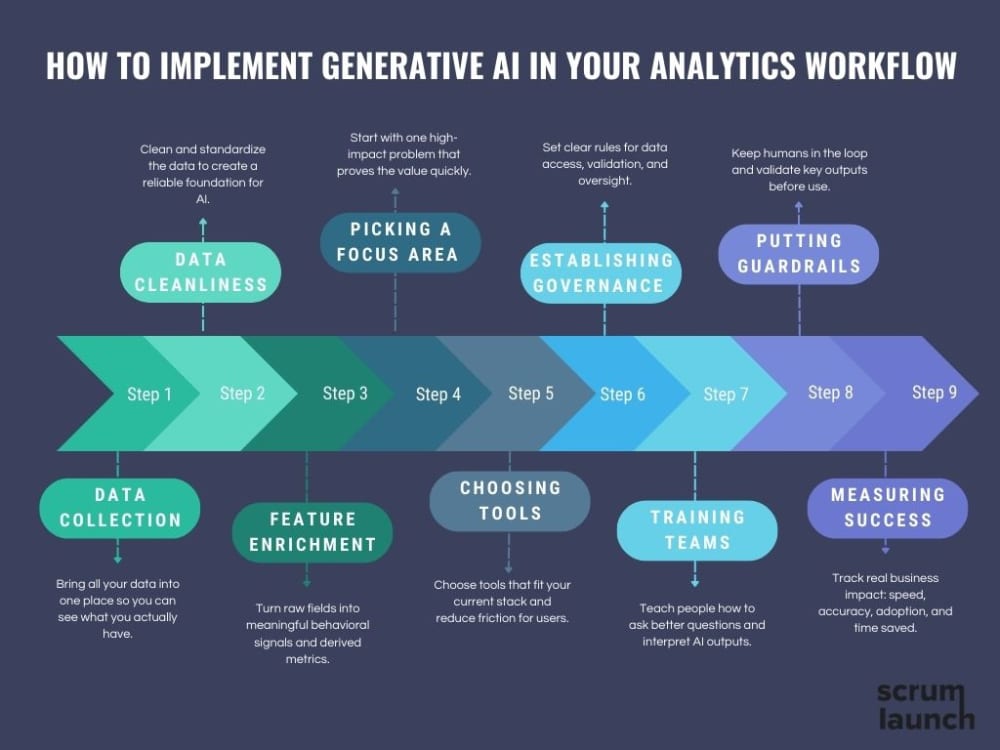
Implementing generative AI isn’t really a technology problem. The tech is already here, and it’s improving faster than anyone can keep up. The real challenge is how you introduce it into your organization - the mindset you bring, the way you sequence the work, and how well you prepare people to use it. If you get those right, the tools become almost the easy part.
Step 1. Data collection
The first step is always the same: data collection. Most companies think they know their data, but when you actually look under the hood, you find data is scattered, duplicated, or poorly documented. No model will magically fix it. Start with understanding the data you have before you bring AI into the picture. Not the theoretical version of it - the situation you have today, with all its gaps, inconsistencies, and legacy decisions. Connect the sources that matter - CRM systems, web analytics tools, behavior logs, CSV exports from teams, and raw tables sitting in your warehouse. When everything flows into a single place, you can finally see what’s complete, what’s missing, and what needs to be cleaned before any intelligent layer sits on top of it.
Step 2. Data Cleanliness
AI works best on reliable foundations. Everything should be standardized: dates are in the correct time zone, prices are in the same currency, and categories are in a standardized directory. Duplicates, omissions, and anomalies, such as erroneous orders for 1,000 units of a single product, should be removed.
Step 3. Feature enrichment
New variables are created (feature engineering): how many times a customer purchased per month, how long ago they visited the site, and how much they spend on average. These derived metrics often prove more important than raw fields like ID or category name.
Step 4. Picking a focus area to pilot
Once the foundation is stable, you don’t roll AI out everywhere. You pick a single, high-impact use case to start with - something that solves a real frustration inside the business. It might be the endless cycle of weekly reporting, or the fact that business teams constantly wait for analysts to write SQL for simple questions. Whatever it is, choose a problem that people will feel immediately when solved.
Step 5. Choosing the right tools
Then comes the tooling. This is where a lot of teams overcomplicate things. AWS, Google, Microsoft - all of them will happily sell you AI. But you don’t need to chase every new platform; you need something that works with your existing stack. For many companies, the simplest move is to enable AI inside the BI platform they already rely on every day. If your analysts live in Power BI or Tableau, extending those tools with AI is a perfectly logical step. Other teams prefer embedding an LLM assistant directly into the warehouse or adding a lightweight custom layer on top to handle natural-language queries. If you want something faster and more opinionated, platforms like Zenlytic or Sigma are built for speed and low friction, with strong AI-native experiences out of the box. Databricks AI/BI, on the other hand, feels natural for teams that already work in a lakehouse environment. The point isn’t to chase novelty - it’s to remove friction for the people who will actually use the system every day.
Step 6. Establishing Data Governance
After that comes governance, and this is where things usually break if you skip it. AI needs boundaries. You have to be crystal clear about which datasets it can access, how results are validated, and what level of oversight is required before insights get used in real decisions. Without this structure, even a great system can turn into a source of confusion or risk. Governance isn’t bureaucracy - it’s institutional clarity.
Step 7. Training your teams
And then you face the part most companies underestimate: training your people. Generative AI changes how people interact with data. It’s not enough to tell them, “Ask the system a question.” You have to show them how to frame questions well, how to interpret what the AI returns, and how to challenge an output that doesn’t look right. Your analysts, especially, need to shift from being report generators to becoming reviewers, validators, and translators of insights.
Step 8. Putting guardrails in place
With people trained, you can finally put the guardrails in place. AI is powerful, but it’s not perfect. Human review stays in the loop. Version control becomes mandatory. Every key output needs validation. These aren’t constraints - they’re what allow you to operate with confidence at scale. Without guardrails, you won’t trust the insights. Without trust, no one will adopt the system.
Step 9. Measuring Success
And once everything is running, you measure success the same way you would for any strategic initiative - in real business terms. How much time did the team get back? How quickly can someone move from a question to an answer? How many people outside the data team are now using analytics independently? Are predictions more accurate? Are decisions being made faster? These are the indicators that tell you whether AI is actually bringing value or just creating a nice demo.
Final Thoughts
Generative AI isn’t here to replace analysts. It’s here to remove repetitive work, accelerate decision-making, and unlock insights that used to require specialized skills. The winning formula is simple: humans plus AI equals smarter, faster, more strategic analytics. Teams that embrace these capabilities today will move faster, innovate confidently, and build truly data-driven cultures. But just like with any technology, the key isn’t chasing hype. It’s thoughtful implementation, ongoing learning, and adapting as the tools evolve.