Below we break down the real cost of building a grocery delivery app in 2026, along with what actually drives the price up, what features matter most, and practical advice for startups on how to build smarter.
What Are Grocery Delivery Apps and How Are They Different from Food Delivery Apps?
Most people think grocery delivery is just an extension of food delivery. Same idea, just different products. That’s partially true, but it misses what actually makes these apps so hard to build. When someone builds an app like Uber Eats or DoorDash, they're creating a marketplace that connects customers to restaurants. The restaurant owns the inventory. The app routes the order.
When it comes to grocery delivery, instead of a fixed menu, you’re working with live inventory, and that inventory changes constantly: items go out of stock, they have to be replaced, quantities vary, and prices can depend on weight. None of this is clean or predictable.
On top of that, someone has to pick those items. So you’re also coordinating human workflows inside physical stores. That introduces a whole new layer: picker tools, routing inside stores, substitution logic, and real-time communication with customers.
That's why grocery apps tend to be more expensive to build and maintain. The user experience might look similar on the surface, but the system behind it is doing significantly more work.
Industry Key Players: Is There Room for New Entrants?
According to Wise Guy Report, the grocery delivery app market is growing fast and it is projected to reach $45 billion by 2035 from $15.5 billion in 2025. Much of that growth is being captured by established giants, who have the logistics infrastructure and brand recognition to dominate at scale. Some of the major players are:
- Instacart, which dominates as the leading multi-vendor marketplace, partnering with thousands of retailers and using a large network of independent personal shoppers.
- Walmart Grocery, which leads in overall U.S. market share by leveraging its massive single-chain network, offering low prices and convenient pickup/delivery.
- Amazon, which combines logistics, retail, and marketplace into one ecosystem, with grocery delivery as an extension of its core e-commerce business.
- Shipt (Target), which emphasizes a strong subscription model for unlimited deliveries.
- Ocado, which stands out with highly automated robotic warehouses, powering efficient fulfillment for its own operations and partner retailers.
But a tripling market creates room for underserved cities and specific product categories - organic, ethnic, premium - as well as newer models like farm-to-table or hyperlocal quick commerce. They represent genuine entry points for players who aren't trying to compete on everything.
Factors Affecting the Cost of Developing Grocery Delivery App
The cost of developing a grocery delivery app depends heavily on what type of app you are aiming for, its complexity, your team model (in-house or outsourced), its location (US/Western Europe rates are 2–3x higher than Eastern Europe/Latin America), as well as the number of third-party integrations.
1. Type of the Grocery App
Not all grocery apps are the same. They might be of different complexity and correspondingly very different price tags.
Single-store apps (Walmart, Kroger)
It is the simplest type of grocery app. You’re building for one retailer or one chain. It means one inventory system, one set of rules, and one operations team, which makes everything easier, from architecture to fulfillment. So, it is often the fastest app type to launch.
Multi-vendor marketplaces (Instacart-style)
Such grocery apps aggregate multiple stores into one platform. It means syncing different inventories, managing vendor dashboards, splitting commissions, and coordinating delivery across multiple sources. The upside is selection and scale. The downside is significantly higher complexity across every layer of the system.
Quick commerce apps (Gopuff, Blinkit, Zepto model)
This grocery delivery app aims to optimize for speed above everything else. The usual promise is 10–30 minute delivery. To make that work, you need dense logistics networks, micro-warehouses or dark stores, and extremely tight operational control. Inventory has to be real-time accurate. Fulfillment has to be near-instant. It isn’t just a product challenge; it’s an infrastructure business.
Subscription-based grocery apps (MilkBasket, The Modern Milkman)
Instead of on-demand orders, such apps focus on recurring deliveries - milk, bread, eggs, and daily groceries. It reduces some types of complexity (fewer real-time decisions per order), but introduces others: subscription logic, forecasting, flexible scheduling, and reliable recurring fulfillment. The upside is predictable revenue and stronger retention.
Farm-to-customer platforms (GrubMarket, Farm to People)
These apps focus on supply chain transparency and freshness of products. They connect users directly with local producers: fewer intermediaries, more emphasis on freshness, seasonality, and product storytelling. Logistics can be less frequent but higher value per order. It’s a smaller market, but growing, especially among customers who care about sustainability.
2. App Complexity and Its Features
The inherent complexity of grocery delivery means that building such an app actually requires developing and maintaining separate products that must work together seamlessly in real time.
Customer app (iOS + Android, or cross-platform)
Most teams treat the customer app as “just the UI.” In reality, it’s where your entire product is judged. If something feels slow, confusing, or inconsistent, users won’t troubleshoot - they’ll drop off. So, at a minimum, the app needs to cover the full flow of easy sign-up, accurate address validation, clean browsing and search, real-time inventory, a reliable cart, clear substitution options, smooth checkout, flexible delivery slots, live tracking, shopper communication, notifications, and quick reordering.
None of these features is complex on its own. The challenge is making them all work together reliably, especially when inventory, pricing, and availability are constantly changing. That’s why this isn’t a small build.
Making the first version cross-platform is the right call. It gets you to market faster, costs significantly less, and leaves the door open to rebuild in native later if scale genuinely demands it. Most products never reach that point, and the ones that do have the revenue to justify it.
Shopper/picker or delivery partner app (iOS + Android, or cross-platform)
This one is designed for delivery executors - people who physically go into the grocery store, pick the items from the shelves, pack them, and deliver them to the customer. The simple use flow of the shopper app is the following: a shopper opens the app, views nearby available orders, and accepts one (or a batch). They receive the store location and shopping list, then follow an optimized in-store route with aisle guidance. As they shop, they scan items or mark them as picked, handle substitutions via chat with the customer when needed, pack the order, and finally deliver it to the customer’s address before marking the order complete.
At a minimum, Shopper/picker app needs to support batch order handling, clear in-store navigation, barcode scanning for accuracy, proper handling of weighted items, smooth substitution flow, in-app chat, exception handling, earnings tracking, and delivery routing. And just like the customer app, the complexity isn’t in individual features. It’s in making everything fast and reliable under real conditions.
Admin panel (web)
It is the central control system for you and your team. It serves as the command center for the entire platform. The Admin Panel handles user management, shopper and store onboarding, verification processes, financial reporting, payout management, dispute resolution, platform-wide promotions, and overall analytics. It gives you full visibility and control over everything happening on the platform.
Merchant/store dashboard (web)
It is a web-based admin panel designed for stores, supermarket chains, or individual merchants for managing daily operations. It allows store administrators to control their business on the platform without needing technical support from your platform team and developers. Main functionalities include managing the product catalog, updating inventory in real time, viewing incoming orders, setting delivery zones, running promotions, and checking revenue and commission reports.
When you ask how much a full-scope grocery app costs, you are really asking about all these pieces together. Each one needs to be designed, built, and tested. Each of these is a real software product with its own design system, state management, and backend dependencies.
Not every product is mandatory from day one. If your own employees handle picking, a simple order management screen is enough - no shopper app needed. A merchant dashboard becomes essential the moment you bring multiple stores onto the platform, since each store needs to manage its own catalog and orders independently.
Advanced Features That Add Real Cost
Most teams think once the core product is done, they’re “almost there.” That’s partially true. But the real gap between a functional app and a competitive one shows up in what you add next. These features aren’t required to launch. They’re what make the product actually stick.
On the customer side, it starts with personalization - recommending products based on behavior, not just showing a static catalog. That sounds simple, but it means building a data pipeline and layering a recommendation system on top of your backend. Then you have loyalty and referrals - points, cashback, incentives. Subscription and auto-reorder add another layer, turning one-time purchases into predictable behavior.
On the merchant side, basic dashboards aren’t enough for long. Stores want to understand what’s selling, what’s slowing them down, and where they’re losing customers. That’s where more advanced analytics come in and that’s a separate layer of work, not just a few extra charts.
On the operations side, things get more technical. Route optimization, for example, sounds like a feature, but it’s really an algorithmic problem. Most teams don’t build it from scratch - they integrate third-party services, but it still adds cost and complexity. Inventory forecasting is another step further. It only becomes useful once you have enough data, but when you do, it starts driving real efficiency in how stock is managed.
3. Team and Regional Rates
The same app can cost $40K or $120K. The difference isn’t just geography - it’s how the work gets done.
Freelancers are the cheapest on paper. They work well for clearly defined tasks. But once scope gets fuzzy or you need coordination across multiple people, things slow down fast. You save on rates, but often pay in time and rework.
In-house sounds appealing, but it only makes sense if you’re building a product where engineering is core to the business. Otherwise, you’re taking on full salaries, hiring overhead, and management complexity before you actually need it.
Outsourcing sits in the middle. You get a team, established processes, and you don’t have to build everything from scratch internally. That’s why most companies start there.
Rates vary significantly by region:
- US / Western Europe / Singapore → $120–$200/hour
- Eastern Europe → $35–$70/hour, with comparable engineering quality in many cases
- Latin America → $40–$80/hour, growing fast with strong US time zone overlap
- Asia → lowest rates, but more variability in communication, quality, and timelines
Eastern Europe and Latin America have become the default for a reason - strong engineering quality at a much more efficient cost. The main difference between them is time zone: Latin America is easier for real-time collaboration with US teams, while Eastern Europe often runs more async.
Asia comes in at the lowest cost, but with more variability. It works best when the scope is clearly defined and tightly managed. For more complex, evolving products, the coordination overhead can offset the savings.
4. Third-Party Integrations
Most of the services your app depends on won't be built from scratch - they'll be third-party APIs and platforms wired into your system. Most people think integrations are a small add-on. In reality, they're one of the easiest ways to increase both cost and complexity.
The ones that matter most for a grocery delivery app are maps and routing, payments, and real-time messaging. Google Maps Platform covers routing, store location, and delivery tracking. The integration cost is relatively low since it's well-documented. Stripe handles standard transactions fine, but grocery delivery requires pre-authorization flows for weight-based items and final charge adjustments after the shopper bags the order - that custom logic adds engineering time beyond a standard checkout integration. For customer-to-shopper communication during picking, most teams use Sendbird, Stream, or Twilio rather than building messaging from scratch. The integration is straightforward; the ongoing cost is what adds up over time.
Retail POS and inventory systems are the expensive exception. If you're integrating directly with a grocery chain's inventory database or POS system, you're dealing with legacy enterprise software that was never designed for API access. Custom integration work per retailer can run $20,000–$60,000, depending on their technical maturity. Most early-stage platforms avoid this entirely by managing the catalog manually until they have the volume to justify it.
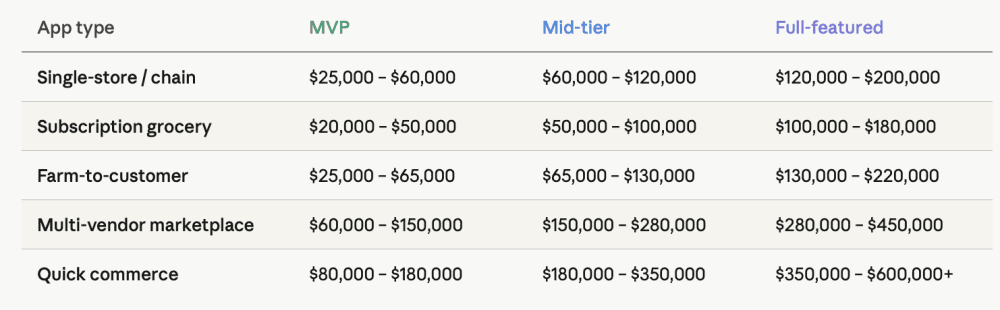
Cost breakdown by app type
Below are the estimates that reflect different scope products built by an Eastern European development team. Ranges reflect complexity variation within each app type - simpler implementation on the low end, more complete solution on the high end.
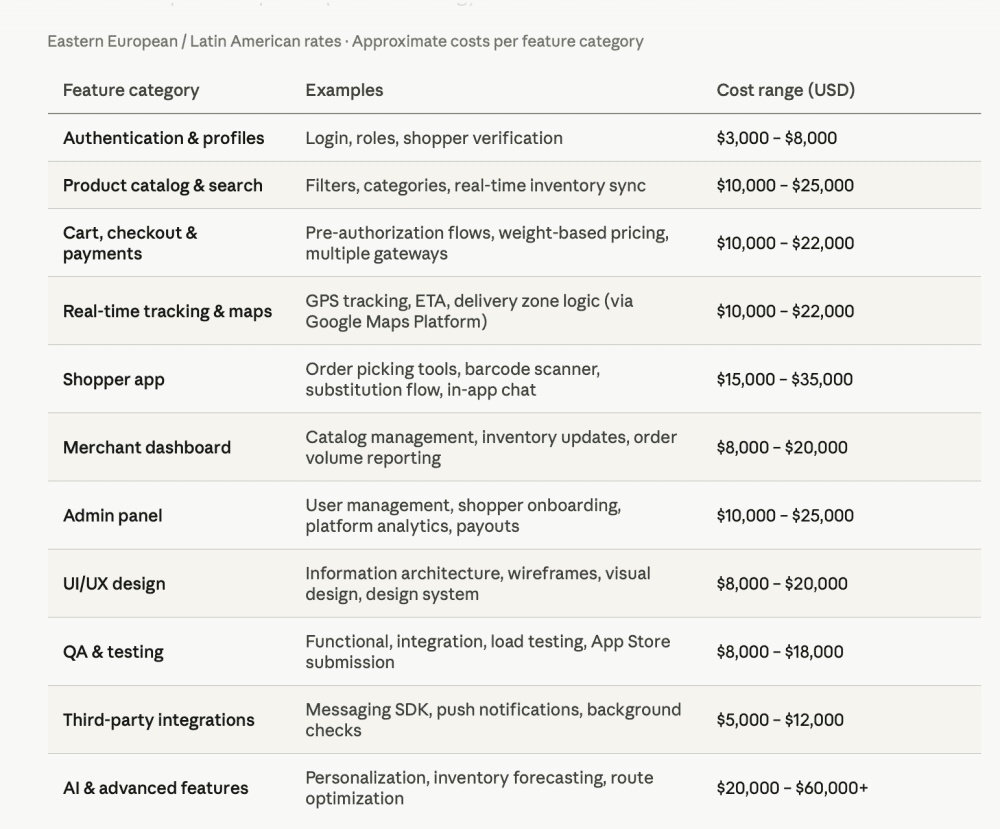
Feature-by-Feature Cost Estimates
Hidden Costs to Budget For
The development quote is rarely the final number. Budget for:
Ongoing API usage fees. Google Maps Platform runs $500–$800/month for small to growing apps, reaching $8,000+/month for platforms processing thousands of daily orders. Payment processing fees run 2.9% + $0.30 per transaction - worth factoring into your unit economics early since it compounds quickly at scale. For messaging, Sendbird and Stream charge based on monthly active users: budget $500–$1,500/month at early stage, scaling to $3,000–$5,000/month as your user base grows. Twilio is usage-based and typically cheaper at low volume, but less predictable as you scale.
Ongoing maintenance. Plan for 15–20% of the initial build cost annually for maintenance, updates, dependency management, and infrastructure scaling.
Shopper background checks and compliance. If you're running your own picker network, background screening, insurance, and gig worker compliance vary by jurisdiction and add up fast. Checkr or similar services typically charge $30–$80 per check, depending on depth and jurisdiction - a real operational expense when onboarding your initial picker network.
Practical Advice for Startups: MVP vs. Full Platform. What to Build First?
Most successful grocery delivery startups don't launch with everything. A defensible MVP doesn't need to do everything on day one. Start with a customer app, one city, and one partner store. Skip automated inventory sync; a manual catalog is enough to validate the model. Keep substitution simple: allow or disallow, no ML. Use Stripe to handle payments. A minimal admin panel covers the basics.
That's a shippable product you can learn from, and it gets you to market in 5–6 months with a realistic budget of $80,000–$150,000 depending on your team's location and rates. The goal is to validate shopper retention, order completion rates, and customer reorder behavior before investing in the catalog infrastructure, substitution engine, and merchant self-serve tools that the full platform requires.
Bottom Line
The biggest mistake founders make in grocery delivery is treating it like a standard marketplace.
It’s not. It’s an operations-first model supported by software. That’s why you’re not just building software - you’re building a system that has to work in real time, in physical environments, with imperfect data and human execution. That’s where most of the cost, and most of the failure, come from. The founders who get it right don't start by asking how cheap they can build it. They start by understanding what they're actually building - then find the most efficient path to get there.