If you've ever copied the same mega-prompt into an AI chat window for the tenth time, you've already discovered one of the biggest limitations of working with AI today. Whether it's “summarize this document,” “format the output like this…,” “write in our company’s tone, which is…,” or “clean this dataset first according to…,” the pattern is familiar: the same instructions repeated across different conversations and projects.
Claude Skills, introduced by Anthropic in late 2025, aims to solve this problem. Instead of rewriting instructions every time, Skills allow you to package repetitive tasks and workflows into reusable capabilities that Claude can call when needed. A Skill might summarize reports, prepare structured spreadsheets, generate formatted documents, or follow a company’s communication standards - all without requiring new instructions in every chat. The result: less prompting, more action.
In this article, we'll explore what Claude Skills are, how they work, how they differ from projects and MCPs, and the real benefits they offer for businesses and everyday tasks.
What are Claude Sills: the Simple Explanation
In simple words, Claude Skills (Agent Skills) are reusable automations that package your experience and processes once so that the model can reliably replicate them without endless explanations in every new chat. You describe exactly how a task should be completed (format, criteria, templates) once. You save it as a Skill. Then Claude automatically understands from the context when it is applicable and loads it. That is, instead of writing every time: Here is our document/post/report format, here is how we calculate metrics, here is our tone - you formalize it into a skill once, and then the AI remembers and reproduces it.
From the formal point of view, a Skill is a Markdown SKILL.md file telling the model how to do something with sample results, optionally accompanied by extra documents and pre-written scripts that the model can run to help it accomplish the tasks described by the skill. These can be
- Support files (templates, examples)
- If required, executable code (scripts for data analysis, file manipulation, etc.)
- Metadata: when the skill is appropriate, what commands/wording should activate it.
Here’s the example you can copy-paste into your status-update/SKILL.md file:
---

name: status-update-writer
description: Creates short, professional status updates in bullet-point format following a lightweight STAR (Situation-Task-Action-Result) pattern. Always concise (max 150 words). Use this skill whenever the user asks to write, draft, generate, or summarize a status update, standup note, weekly report, or progress summary — even if phrased casually like "quick update on X", "what do I say in standup?", "summarize progress for Slack", or "write a status for [project]". Trigger on any request mentioning: status update, standup, weekly report, progress summary, async update, OKR update, or similar.
---

# Status Update Writer

You are an excellent async communicator. When writing status updates, always follow these rules.

## Structure

Use this exact lightweight STAR format:

- **Situation** — 1 sentence of context / what this is about
- **Progress** — what was actually done (focus on outcomes, not activities)
- **Blockers / Next** — any problems + immediate next step(s)

Keep total length under 150 words (aim for 80–120).

## Tone & Style

- Professional yet friendly
- No fluff, no corporate buzzwords unless the user explicitly asks
- Active voice
- Emoji sparingly — only ✅ ❌ ⚡ ❗ when they add clarity
- Dates in DD MMM format (e.g. 11 Mar)

## Output Format

Always begin with:
## Status Update — [Topic / Task name] — [Date]

Then the bullets.

Always end with:
*Let me know if anything needs clarification.*

## Additional Rules

- Pull relevant facts from previous messages in the conversation if available
- If specific data or numbers are missing and would make the update stronger, ask for them — never invent them
- Do NOT write long prose paragraphs
- Do NOT add motivational quotes
- Do NOT assume unstated information
Claude Skills teaches AI to perform a specific type of task according to your standards in a repeatable way, whether that's creating documents with your company's brand guidelines, analyzing data using your organization's specific workflows, or automating personal tasks.
Claude dynamically loads only those skills that are needed for a specific task, not to clutter the context. This allows Claude to work more precisely with repetitive or technical processes. For example, one Skill can automatically format a presentation according to the company's corporate style, another can conduct a complex analysis of customer feedback and compile a detailed report, and a third can adapt Excel document formats to corporate standards.
Think of it like onboarding a new employee. Instead of explaining your processes from scratch every single conversation, you package that knowledge once into a Skill and Claude draws on it automatically whenever it's relevant.
Types of Claude Skills: Built-in and Custom
Skills are divided into two main types:
Anthropic Built-in Skills: are built and maintained by Anthropic. These include enhanced Excel spreadsheet creation and manipulation, along with other common document workflows. They're available to all users and trigger automatically.
Custom Skills are ones you or your organization create. Such skills can include applying brand style guidelines to documents and presentations, for instance, applying particular brand colors, generating communications following company email templates, structuring meeting notes with company-specific formats, and executing company-specific data analysis workflows.
How Do Skills Actually Work?
The Skills engine is extremely convenient and intelligent. It usually works the following way:
- Finding the right skill: While working on tasks, Claude looks at the list of available skills and determines which ones are relevant to this request.
- Progressive disclosure: Claude loads only what’s necessary. At startup, it scans available Skills using just their YAML frontmatter (name and description), costing ~100 tokens. When a Skill is relevant, the full instruction body loads at under 5k tokens. Bundled resources like scripts or templates only load during execution. This layered approach keeps things efficient and avoids overwhelming Claude's context window.
- Automatic recall. There is no need to manually invoke skills and type something like "use skill X." Claude automatically understands from your wording that you're talking about, for example, preparing an order/channel analysis/video script, and pulls up the appropriate skill.
- Skill combination. You can use several skills simultaneously. For example, if you ask Claude to "analyze this sales data and put it in a branded report," Claude might activate a data analysis Skill and a document formatting Skill simultaneously, without you having to coordinate that. You don't chain them manually - Claude figures out which combination is needed for the task. It makes Skills genuinely useful at scale.
- Executable code (optional). Skills can contain scripts: then Claude not only knows the procedure, but actually runs the code, for example, to parse a CSV file across advertising channels.
Interaction with Skills can be done through:
- Claude web interface (claude.ai)
- API
- Claude Code
Claude Skills are Portable, which means you write a Skill once and it works everywhere - claude.ai, Claude Code, and the API without modification. A Skill built for your team's document workflow doesn't need a separate version for API users and another for Claude Code users. Same file, same instructions, all environments.
Anthropic has published the anthropics/skills GitHub repository as an open marketplace where you can download ready-made Skills or browse examples. Third-party partners can also submit Skills to Anthropic's official plugin directory.
The Buzz Around Claude Skills: Why Now?
Initially, Anthropic launched Agent Skills quietly in October 2025 - API and Claude Code only. In December 2025 they opened it up to claude.ai users and added admin controls so organizations could roll out Skills to their entire team at once. Anthropic's strategy is clear: launch with developers first to test the concept, then build user-friendly interfaces for everyone else. Anthropic also published a shared open standard at agentskills.io, so Skills could eventually work across different AI tools, not just Claude. Useful, but still largely flying under the radar for most people.
Then, February 2026 changed everything - not for one reason, but three at once. Skills were previously paywalled, but as of February 2026, Anthropic extended them to free users. The same week, OpenAI announced ads for ChatGPT's free tier. And when Anthropic publicly refused Pentagon demandsto remove its AI safety limits, walking away from a $200 million contract, the story went viral. People admired a tech company standing on principle against a powerful government client. Others were already fed up with OpenAI over the ads and needed one last push. Some were simply curious about all the noise. The result: Claude hit number one on the App Store, daily sign-ups tripled, and millions of new users discovered for the first time that Claude could create real files, connect to their tools, and remember how they work with Skills. Today (March 2026), Skills are available on all plans, including free. You can use pre-built Skills (Excel, PowerPoint, PDF, and more), install partner Skills from the catalog, or build your own.
How are Skills different from other Claude features?
Claude has several ways to remember context and follow instructions. It's worth knowing which tool does what.
Skills vs. Custom Instructions: Custom instructions are always active - every conversation, every task, no exceptions. Skills are selective: they only activate when a task actually requires them. Custom instructions are for defining who Claude is to you ("always be concise," "respond in Spanish"). Skills are for defining what Claude knows how to do ("here's how to format our company reports").
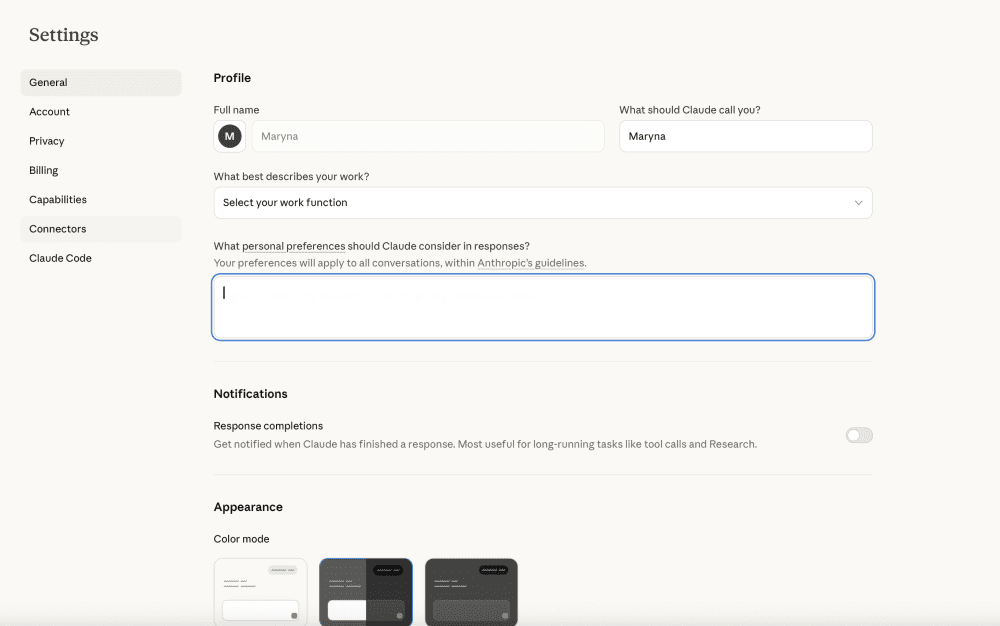
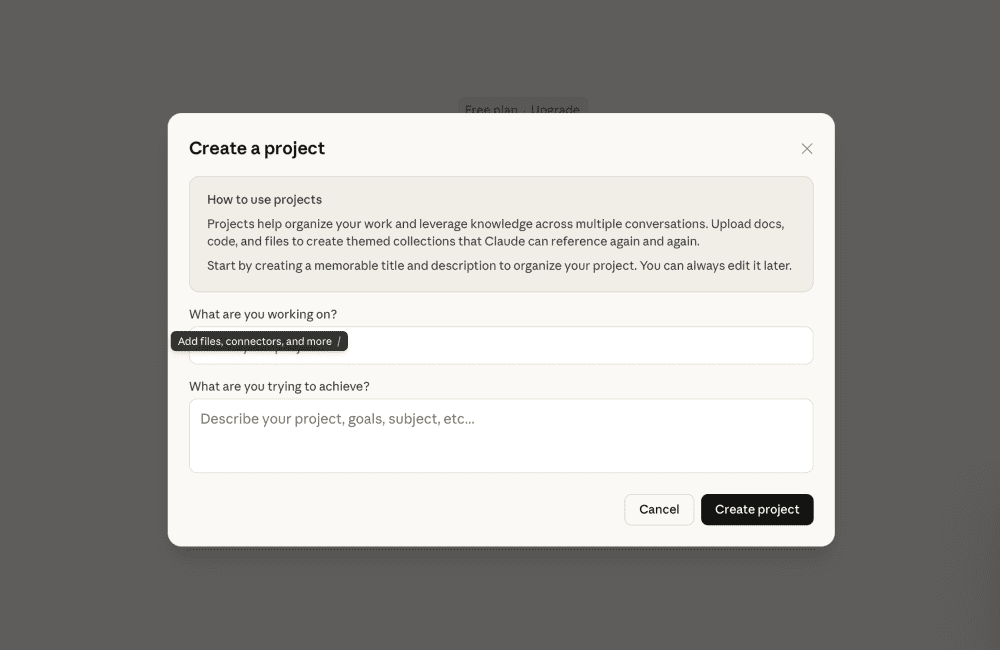
Skills vs. Projects: Projects store files and context that Claude always has access to while you're working in that project — your documents, background materials, ongoing work. Skills are procedures that quietly step in only when relevant, then step back. Use projects to store knowledge and artifacts. Use skills to describe recurring processes.
Skills vs. Memory: Memory, once you enable it in Settings → Capabilities, helps Claude remember facts about you across conversations. It doesn't save full transcripts, just key facts extracted from your chats like "you prefer bullet points," "you have a meeting every Monday". Those facts accumulate over time and stay until you delete them. Skills, on the other hand, teach Claude how to complete a specific type of task, regardless of who's asking.
The simplest way to think about it: Memory is about you. Projects are about your work. Custom instructions are about your preferences. Skills are about how a task gets done.
Building Your Own Skill
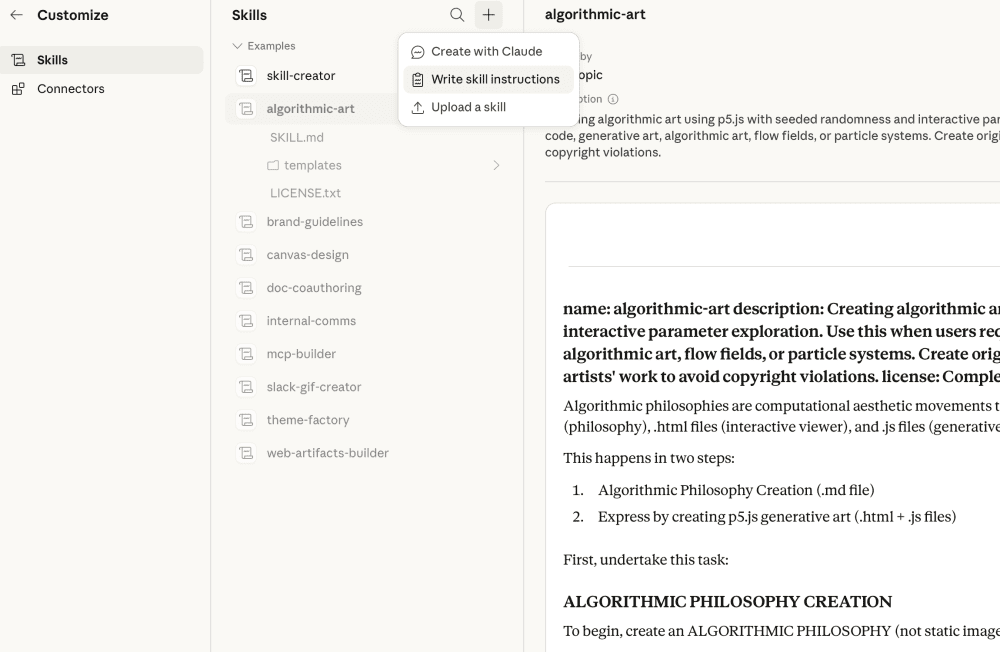
Creating a custom Skill is more accessible than you might expect. For developers who want full control, Skills are simply folders with a SKILL.md file containing instructions written in plain Markdown. You can add reference files, executable scripts, or code for more advanced functionality - whatever Claude needs to do the job.
But you don't need to be a developer. The built-in Skill Creator provides interactive guidance: Claude asks about your workflow, generates the folder structure, formats the SKILL.md file, and bundles the resources you need - no coding required.
Security and Quality
Anthropic places special emphasis on Skill security. Skills may include, or instruct Claude to install, third-party packages and software. The most significant risks are prompt injection and data exfiltration. It is recommended to use only verified and trusted skills, especially those that involve code execution, to prevent data leaks and other threats. It's essentially the same principle as not installing random browser extensions or npm packages from unknown sources.
Quality is more of a practical note: skills are only as good as their instructions. A vague skill will produce mediocre results; a well-crafted one with clear templates and examples will produce much better outputs.
Real-World Applications of Claude Skills
Every job has its version of the same problem: you do the same type of task repeatedly, and every time you use AI, you start from scratch - re-explaining your tone, your format, your criteria, your audience. Skills fix this. You describe the context once. After that, Claude works like a trained assistant who already knows your standards.
A content writer shouldn't have to re-explain their brand voice every Monday. An ad buyer shouldn't re-list their channel criteria for every campaign review. A product manager shouldn't re-describe their PRD format for every new feature. Here's what that looks like across different roles.
Research & Analysis: A market analyst needs a competitive snapshot every week. They set up a skill once with their preferred format, then just drop in the company name each time. "Prepare a 1-page competitive snapshot with pricing, positioning, and 3 differentiators."
Sales & Marketing: A content team repurposes webinars into blog posts, LinkedIn updates, and tweets, without briefing Claude on tone or format each time, because the skill already knows them. "Convert webinar transcript into a blog post, LinkedIn post, and 5 tweets in [brand voice]."
Operations & Support: A support lead stops manually triaging tickets. The skill already knows the categories, severity levels, and output format - clean JSON, ready for their dashboard. "Categorize support tickets by category, severity, and next steps; output JSON."
Product & Engineering: A PM turns a problem statement into a full PRD with assumptions,
success metrics, and open questions - the skill handles the structure every time. "Based on the problem statement and objectives, create a PRD with assumptions, metrics, and open questions."
Legal & Compliance: A legal team extracts key clauses from contracts and flags anomalies automatically — but a human reviews before anything is acted on. Skills handle the grunt work; judgment stays with the lawyer. "Extract indemnification, termination, and confidentiality clauses; note any anomalies."
In each case, the instruction in italics is what you write once inside the skill, not what you type to invoke it. That's the whole point: you write that detailed prompt once when creating the skill, and then you never have to type it again.
When you actually use the skill, you'd just say something like "run competitive snapshot on [company]" or even just attach a document - the skill already knows the format, structure, and output you want.
For enterprise teams, Skills can be enabled at the organization level, so every person in a department works from the same templates, the same tone guidelines, and the same document standards.
Limitations and Pitfalls
A common criticism among developers and Claude power users is that Skills are simply a structured prompting layer that don't give Claude new capabilities, just make consistent outputs easier to achieve. That's technically true. If you're looking for a fully autonomous agent system, Skills aren't that. They're closer to a well-trained assistant than a self-directed one. For most everyday professional workflows, that's exactly what's needed. For complex multi-step automation, you'd want to look at more advanced agent frameworks.
Skills also have their own "buts" that are worth keeping in mind before you invest time building them:
- Skills don't suit constantly changing processes. If you're still experimenting with format and haven't landed on what works, building a skill too early will mean rewriting it frequently. Find a stable, repeatable scenario first - then build the skill around it.
- Quality in, quality out. A skill is only as good as the instructions inside it. Vague wording, internal inconsistencies, and no examples will produce unpredictable results. The more precisely you define the expected output, the more reliably the skill delivers it.
- Skills don't update themselves. If your process changes - a new doc format, a revised tone guide, updated criteria - you have to go back and rewrite the skill manually. It won't adapt on its own, which is another reason to wait until a workflow is stable before turning it into a skill.
- Some organizations restrict third-party code execution. Skills that go beyond holding instructions - ones that run scripts, install packages, or execute code - can be blocked at the network, corporate IT or security policy level before it ever does anything. It is common in finance, healthcare, and legal environments where data handling is tightly controlled. If you're building Skills into a team workflow, check with IT first, especially if the skill does anything beyond storing text instructions.
Should you start using Skills?
Start building Skills if you regularly explain the same processes to AI, work with stable formats - posts, videos, documents, reports - and are willing to spend time documenting what you know. They're especially valuable if you work in a team and want junior colleagues to benefit from your packaged experience rather than figuring things out from scratch.
Skills are not suitable if you're still exploring what AI can do for you, or if your processes change significantly week to week. A skill built around an unstable workflow will need constant rewriting, which defeats the purpose.
Done right, Skills shift Claude from a tool you prompt into an assistant that already knows how you work - your formats, your standards, your expectations. You stop explaining yourself. Claude stops asking. The work just gets done.
Conclusions
Skills won't make Claude more powerful. The goal was never a smarter AI. It was an AI that already knows how you work. Skills won't replace complex agent systems or automate things Claude couldn't already do. What they will do is stop you from repeating yourself. If you have workflows that are stable, repeatable, and currently eating your time - that's where Skills earn their place. The beauty is in the simplicity. You don't need to be a developer. Start with one annoying, recurring task - status updates, report formatting, email templates, competitive analysis - build (or let Claude build) a Skill, test it for a week, and feel the difference. When it clicks, you'll wonder how you ever tolerated endless copy-pasting of the same instructions.


