In 2026, AI isn’t just a nice-to-have - it’s a force multiplier that allows resource-constrained startups to compete with bigger players, ship better products, and achieve more with smaller headcounts. From solo founders to Series A teams, startups are actively embedding AI across product development, marketing, operations, sales, and strategy.
But picking the right tools matters more than most founders expect. The wrong stack creates subscription fatigue and constant switching costs. The right one lets a team of five operate like a team of fifty.
While there's no shortage of effective AI tool roundups, most of them feel like sponsored product pages. This one is different - it draws directly from what early-stage operators are actually using daily, what delivers measurable time savings, and where the friction still lives.
So, what kind of AI tools do early-stage startups usually need?
This guide focuses on early-stage startups already running a real product, selling it, supporting customers, and managing coordination, often with the same handful of people wearing all four hats. If you're a solo founder still validating, most of this is premature. If you're Series B with dedicated ops, you've likely already solved these problems with headcount. At this stage, every saved hour directly translates into faster product progress. And that's where AI tooling either earns its place or becomes one more subscription nobody fully uses.
The strongest startup teams in 2026 are choosing to use fewer tools. Teams that carefully pick a small set of AI systems that work well together tend to keep moving forward, instead of constantly questioning whether they picked the right stack. That's a meaningful shift from the "stack everything" mentality that dominated 2024.
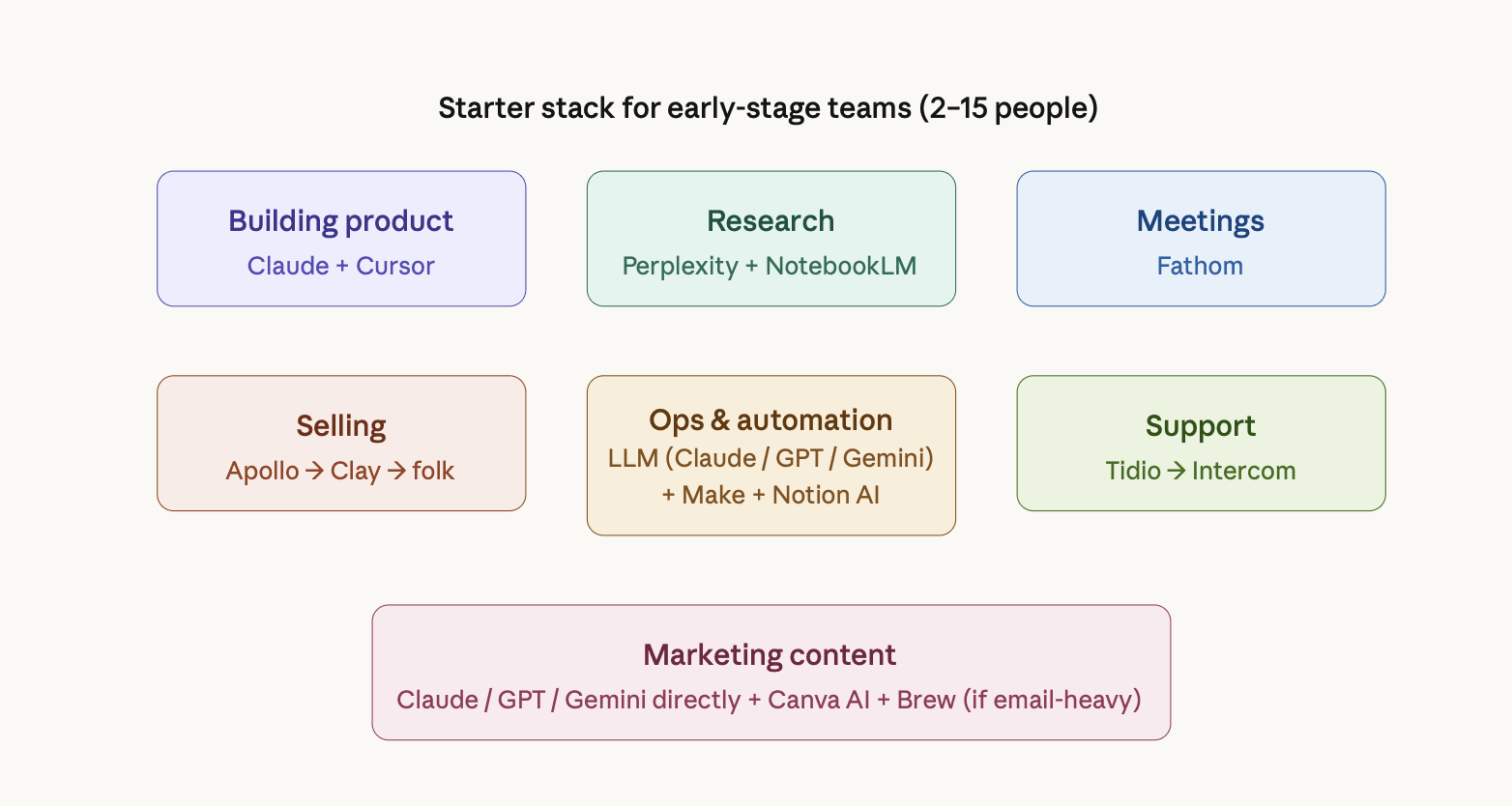
Building product: Cursor + Claude Code
For technical founders, Cursor keeps appearing as the default code editor. Many switched from GitHub Copilot for better context and speed. The reported value isn't autocomplete - it's codebase-level understanding: refactoring against logic in a different file, reviewing pull requests, catching bugs before they reach review. One team reported cutting their dev cycle by roughly 40%.
Claude Code sits alongside it for the heavier lifting - context-aware debugging, explaining decisions made during a sprint three months ago, and cleaning up test coverage. Teams using both consistently describe them as complementary rather than overlapping.
For non-technical founders, the design-to-code workflow showing up in founder discussions is worth noting: ChatGPT to generate a Figma prompt → Figma Make for design → Cursor for final implementation. Specific enough to be actionable.
Selling: AI outreach automation
Multiple operators independently flagged this as their highest-ROI use case. One team went from 4 hours a day on prospecting to 30 minutes reviewing what the AI sent overnight. Another described going from a 2–3% reply rate to over 15% after switching to a system that adapts based on conversation history rather than templates.
The workflow has two jobs: research and enrichment, then sequencing and follow-up. Apollo appears in startup discussions frequently as the tool that covers both. It has its own prospect database, plus enrichment and sequencing on top of that. For a team of 2 to 15 people, this is usually enough as you're not paying for different tools to do one job, and the built-in enrichment covers most personalization needs at this stage.
Most teams at this stage don't need a standalone CRM yet - Apollo tracks the pipeline well
enough until more than one person is closing deals. For teams that hit that point but aren't ready for HubSpot's full weight, folk is worth looking at - lightweight, AI-native, a practical first CRM, built for small teams.
Startups often add Clay when Apollo's enrichment isn't enough. Clay pulls from significantly more sources - LinkedIn, the web, social signals - and handles more complex personalization logic. Teams start using it when they need outreach to feel genuinely tailored at scale, not just name-and-company personalized. It's an additional layer on top of your sequencing tool, not a replacement for it.
Instantly, and Smartlead appear in teams that have outgrown Apollo's sequencing limits - typically higher volume, more established outbound motion. Not the starting point for the early stage.
The consistent pattern across operator discussions, regardless of stack: AI handles research, personalization, and follow-up sequencing. A human reviews exceptions and closes. Nobody is removing the human from the close.
Running ops: LLM as a context layer
The most interesting use case showing up in startup discussions isn't Claude, GPT, or Gemini as a writing assistant. It's an LLM as a pre-processing context layer across the business. Instead of people jumping between tools to understand what’s going on, an LLM sits in front of your systems and prepares the full picture before anyone takes action. When a request comes in - whether it’s a billing issue, internal question, or sales-related task - AI pulls relevant data from your core tools (like Apollo, Stripe, or internal docs) and turns it into a clear, structured summary. The value isn’t automation for its own sake. It’s removing the time spent figuring out the situation before you can even start solving it.
Instead of spending 10–15 minutes digging through CRM records, payment history, and past interactions, a team member opens the request and sees a ready-made briefing. Many teams report cutting the time spent per request from 15 minutes down to just 3 minutes.
The honest caveat from the same team: "it doesn't know which context is stale." It means AI is excellent at pulling information together, but it doesn’t know what’s outdated. If a customer upgraded their plan last month but the old note still says they’re on the previous plan, the AI will happily include the stale information. “Freshness” of data is still a manual problem most teams haven’t fully solved yet.
Two tools sit underneath this kind of setup for most early-stage teams:
Make is the connective layer - it links your tools together and automates repetitive handoffs without code. A form submission routes into your CRM, a closed deal triggers a Slack notification, and an incoming ticket gets passed to an LLM for triage before anyone opens the queue. It appeared consistently in the operator discussions, and it's more flexible than Zapier for the kind of multi-step workflows early teams actually need.
Notion AI handles the internal knowledge side, turning messy meeting notes into structured action items, summarizing long docs, and keeping a lightweight knowledge base that doesn't require a dedicated person to maintain. The specific job it does well: a 45-minute meeting becomes a clean list of owners and next steps without anyone spending time writing it up.
Together, these two cover most of what an early-stage ops setup needs before you have dedicated headcount for it.
Supporting customers: triage before it reaches a human
While the previous section focuses on AI as a general context layer across the business, this is a more specific use case - applying the same idea directly to customer support. With a team of 5 to 15 people, you can't afford a support function, but you also can't afford your best engineers fielding the same question for the third time that week. Two workflows keep appearing in operator discussions in this connection.
The first one is AI triage that categorizes and drafts responses to common tickets. When a ticket comes in - via email, chat, or a form - an AI layer reads it before any human does. It classifies the request by type (billing issue, bug report, how-to question, feature request), checks it against your help docs and past resolved tickets, then either drafts a response if the answer is clear or flags it for human review if it's ambiguous. The support person opens the queue to prioritize tickets with draft responses already attached. They're editing and approving, not starting from zero on every message. As one founder described, their support person went from drowning to having actual time for complex issues that genuinely need human judgment.
Tidio is the practical starting point - free plan available, handles live chat and email, and has basic AI triage without the setup complexity or cost that heavier tools bring at this stage. Intercom makes sense when you need more sophistication and have the budget for it. Its Fin AI agent handles a significant portion of queries end-to-end before a human gets involved. Both Intercom and Tidio offer startup programs worth checking before committing to a paid plan.
The second workflow is using tools like Featurebase that takes it a step further. On top of triage, it automatically clusters duplicate feature requests, so your support queue doubles as product research. You can see what customers actually want without reading every ticket individually.
For teams not ready to add another subscription, the DIY route works: Claude, GPT-4o, or
Gemini via API connected to your existing ticketing tool through Make. The mechanism is the same - AI reads the ticket, drafts a response, and a human approves - just without the polished interface.
Neither replaces support. Both make it manageable before you can hire for it.
Research and analytics: Perplexity + NotebookLM
Perplexity keeps appearing as a preferred AI tool for market research specifically because every answer it gives includes real sources. It is important because when you put research into important documents like investor pitch decks, strategy memos or competitor analysis, it reduces the risk of using confident, but incorrect AI-generated data. When a hallucinated statistic (e.g. “The market is growing at 47% CAGR”) gets copied into your deck and no one double-checks it, it can cause serious problems later, especially during investor meetings or when making big decisions.
NotebookLM sits alongside it for internal document synthesis: strategy docs, investor notes, call transcripts, competitor analysis. It's constrained to what you upload, which practically eliminates the hallucination problem for source-heavy work. The neural network responds and acts as a RAG (Retrieval-Augmented Generation) - strictly according to your sources and is always ready to show the exact quote from which it derived a particular conclusion. One founder described it as a tool turning an 80-page paper into something you could absorb on a walk.
For product analytics - understanding what users actually do, not what they say - AI-assisted analysis (feeding usage data into LLM or a notebook) is showing up as a cheaper alternative to dedicated analytics tooling before you hit the scale that justifies a proper data stack.
Marketing content: LLM directly, not a wrapper
Most teams at this stage aren't using specialized AI content tools. They're using LLMs - Claude, Grok, GPT, or Gemini - directly through web interfaces or via API with a custom system prompt, and treating them as writing partners rather than generators. The differentiator reported consistently across discussions is prompt quality, not platform. A well-structured prompt in Claude's web UI outperforms a poorly set up "AI content tool" every time - those, as operators claim, usually produce quite generic content.
The tools that earn their place on top of that:
Canva AI handles design without a designer - social graphics, pitch decks, presentations. Practical rather than gimmicky: resizing for different formats, generating on-brand visuals, and cleaning up layouts. Removes a real bottleneck for teams with no dedicated designer.
Brew for teams running structured email campaigns. It generates complete, on-brand emails from a description, rather than requiring you to build them manually - think of it as Cursor, but for email marketing. One operator described going from 2 days a week on email campaigns to 30 minutes of review time after adding it to their stack.
ElevenLabs is worth noting specifically for startups where audio or video content is part of the growth motion - product demos, explainer videos, personalized outreach. Not a default for every team, but genuinely useful if that format is already in your workflow.
Meetings - Fathom
Fathom records, transcribes, and summarizes calls across Zoom, Google Meet, and Microsoft Teams - and the free tier covers unlimited recordings with no time limits, which is why it shows up consistently in early-stage stacks. Most teams using it have stopped taking meeting notes manually, but the real value is deeper than that: you can query your entire call history conversationally, pulling decisions, quotes, or action items from months of meetings without replaying a single recording. For founders doing constant customer discovery or investor calls, that searchable institutional memory compounds over time. One caveat: the AI summaries occasionally compress nuance - useful for routine calls, worth a human check on anything sensitive.
What they say isn't working
Three complaints repeat across these discussions:
Hallucination confidence - being wrong while sounding certain - is still the top complaint, especially anywhere a confident wrong answer gets acted on before it's verified. Email deliverability, legal language, and financial figures.
Workflow amplification cuts both ways. One operator was direct: "These tools are amazing when your processes are already tight, but if your workflows are messy, they just amplify the mess faster." Automating a broken process makes it break faster and at a higher volume.
More content to sort through, not less sorting. The core frustration, one founder said, is that AI often generates more material to evaluate than actually filters. That's the gap most tools still haven't closed.
The Honest Summary
In 2026, AI is no longer optional for early-stage founders. But what startups at this stage report isn't a transformation story - it's a narrower one: a handful of tools embedded into specific workflows, real-time savings on well-defined tasks, and ongoing manual work for the edges those tools can't see. The winning mindset is to use fewer tools with deeper leverage, treating AI as a thinking partner and execution engine rather than chasing endless apps. The startups getting the most out of AI aren't the ones with the biggest stacks. They're the ones who know exactly which three or four tools they use and why.